
BENFEI USB 3.0 Switch
4.1Editor score
Affordable 2 in 4 out design
5Gbps data transfer speed
Includes extra power supply slot
This guide compares the best keyboard and mouse switch for 2 computers, analyzing USB speed, port counts, and reliability to help dual PC users share peripheral
Managing two computers often means juggling multiple keyboards and mice. A reliable switch lets you share these peripherals seamlessly. Look for solid build quality, fast data speeds, and simple switching mechanisms to streamline your workflow effectively.
We evaluated ten top-rated USB switches designed for dual PC setups. Our analysis focused on port configurations, transfer rates, power delivery options, and user feedback. Each product offers unique strengths tailored to different office environments and device needs.
Each pick highlights key features and real-world performance insights. Prices fluctuate frequently so verify current listings before purchasing. This guide ensures you find the perfect solution to keep your workspace organized and productive without constant cable swapping.
4.1Editor score

4.0Editor score

4.3Editor score
The following table provides a side-by-side comparison of all ten products reviewed. It highlights essential specifications to help you quickly identify the right switch for your specific dual computer setup requirements.


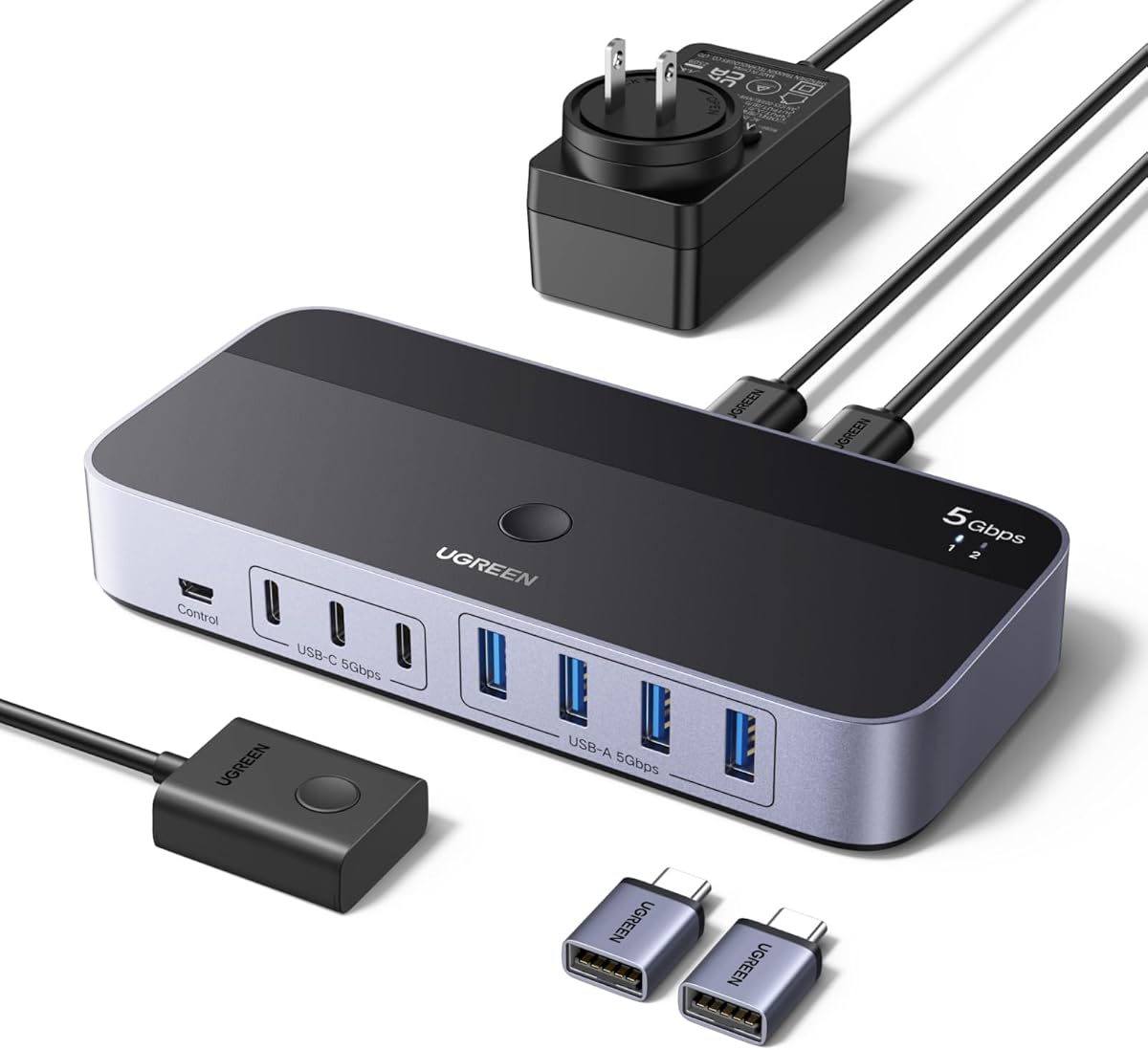

This UGREEN USB 3.0 switch offers a robust solution for sharing peripherals between two computers. It supports up to four devices with versatile connectivity options including USB C and A ports. Users appreciate the flexibility of choosing between a button or external controller for switching tasks efficiently.
We may earn a commission when you buy through this link, at no additional cost to you.
Data transfer speeds reach up to 5Gbps ensuring fast file transfers between connected PCs. The inclusion of a dedicated controller allows you to hide the switch unit while maintaining easy access. Power options via USB C help stabilize performance when connecting multiple high-demand peripherals simultaneously.
While it does not support video transmission which limits it to USB devices only this is standard for this category. Some users note that connecting many devices at once may require the optional power supply to prevent disconnections. These trade-offs are acceptable given the device flexibility.
Ideal for professionals managing dual workstations or home users balancing personal and work computers this switch streamlines workflows. It balances performance and functionality well making it a top choice. Check current listings for availability and ensure compatibility with your specific USB device types.
Supports a mix of USB C and A devices to accommodate modern and legacy hardware seamlessly.
Choose between a physical button or an external controller based on your desk layout preferences.
We may earn a commission when you buy through this link, at no additional cost to you.
The BENFEI USB 3.0 switch provides an affordable entry point for dual computer users needing reliable peripheral sharing. It supports four USB devices allowing you to connect keyboards, mice, printers and more easily. Performance remains solid with 5Gbps speeds ideal for general office tasks.
We may earn a commission when you buy through this link, at no additional cost to you.
Users value the clear LED indicator that shows which computer is active at any time. The external power slot offers room for expansion with high power devices like external hard drives. This feature adds stability without compromising the compact design of the unit.
A minor downside is the power adapter not being included in the box so you may need to source one separately. The design is functional but not particularly stylish. These issues are minor considering the competitive pricing and reliable functionality offered.
This switch suits budget conscious buyers who still require USB 3.0 performance. It works well for standard home office setups. Verify power requirements before purchasing to ensure smooth operation with all your connected devices.
Delivers reliable USB 3.0 speeds at a lower price point than many competitors.
LED indicators provide immediate visual feedback on the active computer connection status.
We may earn a commission when you buy through this link, at no additional cost to you.
This UGREEN USB 3.2 switch delivers top tier performance with transfer speeds reaching 10Gbps. It offers seven ports allowing extensive device sharing between two computers. The inclusion of a power adapter and C adapters makes setup straightforward for various hardware types.
We may earn a commission when you buy through this link, at no additional cost to you.
Users benefit from the high speed data transfer which is ideal for working with large files or media. The ample port count means you rarely need additional hubs. Power stability is ensured which prevents drops during heavy usage with multiple peripherals.
The higher price reflects the premium features and build quality. It also occupies more space than compact 2 port switches. These considerations are worth it for users needing maximum connectivity and speed without sacrificing stability or convenience.
Recommended for power users or professionals with demanding workflows. It future proofs your setup with the latest USB standards. Ensure you have enough desk space and budget before investing in this robust solution.
10Gbps transfer rates significantly reduce wait times for large file operations.
Seven ports support nearly all peripherals without needing extra hubs.
We may earn a commission when you buy through this link, at no additional cost to you.
This compact switch allows two computers to share two USB devices such as a keyboard and mouse. Its aluminum alloy shell provides durability and heat dissipation for longevity. Users appreciate the simple one button interface that requires no drivers.
We may earn a commission when you buy through this link, at no additional cost to you.
The LED indicator helps identify the active computer instantly. Two USB 3.0 cables are included which simplifies setup. This makes it ideal for users who need a straightforward solution without extra complexity or cost.
The limited port count restricts you to two devices which may not suit complex setups. It also lacks USB C ports found on newer computers. However for basic needs this limitation is often acceptable given the high reliability and rating.
Best for users with minimal device requirements or tight budgets. The build quality suggests it will last. Verify port compatibility before purchase to ensure it meets your specific hardware needs.
One button switching with LED feedback makes use intuitive for all skill levels.
Aluminum construction ensures the device withstands daily office use over time.
We may earn a commission when you buy through this link, at no additional cost to you.
This UGREEN switch offers a simple way to share two USB devices between two computers. It supports up to 5Gbps transfer speeds for quick data moves. The plug and play design means no software installation is required.
We may earn a commission when you buy through this link, at no additional cost to you.
Two 5ft cables allow flexible placement on your desk. The one button switch with LED indicator ensures you always know which system is active. This convenience helps maintain workflow without confusion during switching.
Limitations include no video output capability and a two device cap. For users needing more ports or monitor sharing this model may not suffice. However for basic keyboard mouse sharing it remains effective and reliable.
Ideal for standard office setups where simplicity is valued. Check device count needs before buying. The brand reputation adds confidence in long term reliability and performance.
Plug and play design eliminates the need for drivers or complex configurations.
Included 5ft cables allow placement away from immediate ports.
We may earn a commission when you buy through this link, at no additional cost to you.
This Hearvo KVM switch allows sharing a single monitor along with peripherals between two computers. It supports 4K resolution at 60Hz ensuring sharp visuals. The included remote control provides convenient switching options.
We may earn a commission when you buy through this link, at no additional cost to you.
Four USB ports enable connecting multiple devices like scanners and webcams easily. Adaptive EDID ensures smooth image transmission. This makes it ideal for setups where monitor space is limited.
Complexity increases as you manage both video and USB connections. It also depends on having HDMI capable monitors. These factors might be drawbacks for users only needing keyboard mouse sharing without video.
Best for users needing complete dual computer control with one display. Verify monitor compatibility before purchase. The high resolution support is a significant advantage for media tasks.
4K 60Hz support delivers crisp visuals for both computers without lag.
Wired remote allows switching without reaching behind devices.
We may earn a commission when you buy through this link, at no additional cost to you.
This USB 2.0 switch allows sharing four devices between two computers easily. One button swapping makes switching between systems straightforward. LED indicators show the active status clearly. This model suits basic tasks like printing or document access.
We may earn a commission when you buy through this link, at no additional cost to you.
Compatibility with Windows Mac and Linux ensures broad usability. The micro USB port helps stabilize connections. Cables included simplify initial setup. Reliability is a strong point based on user feedback.
Transfer speeds are limited compared to USB 3.0 models. The micro power port may be less convenient than newer USB C designs. These limitations are acceptable for users who do not require high bandwidth.
Ideal for general office use where speed is not critical. Verify power cable availability. The high rating indicates strong customer satisfaction.
One button swapping simplifies switching without extra effort or time.
Works seamlessly across major operating systems without drivers.
We may earn a commission when you buy through this link, at no additional cost to you.
This switch supports four USB 3.0 devices with fast transfer speeds. It helps organize workspaces by reducing cable clutter. USB C power support aids stable operation with demanding peripherals. Two cables are included for quick setup.
We may earn a commission when you buy through this link, at no additional cost to you.
Plug and play functionality ensures compatibility across systems. One button switching with LED indicators keeps users informed of active connections. Performance is reliable for daily tasks like file transfers or scanning.
An extra power adapter may be needed for hard drives. The design is functional but not distinct. These are minor issues for the price point and performance provided.
Recommended for users needing reliable USB 3.0 connectivity. Ensure you have proper power options. The brand quality adds assurance for consistent performance.
5Gbps speeds ensure quick file transfers between connected computers.
Extra power port helps maintain connections for high power devices.
We may earn a commission when you buy through this link, at no additional cost to you.
This switch offers seven ports allowing extensive device sharing. USB C and A support accommodates modern and legacy hardware. A power adapter ensures stability for hard drives and printers. An external controller helps organize the desk.
We may earn a commission when you buy through this link, at no additional cost to you.
Users can connect many peripherals without additional hubs. The included adapter makes setup easier. Switching remains fast and reliable. This is ideal for environments with many devices to share.
The unit is larger than standard switches which may require more desk space. Price is higher than basic models. These factors are reasonable given the extensive capabilities and convenience features.
Best for users with multiple devices needing reliable sharing. Confirm space availability. The mix of port types adds significant flexibility.
Seven ports support extensive device connections without extra hubs.
Power adapter and controller add value and convenience out of the box.
We may earn a commission when you buy through this link, at no additional cost to you.
This switch allows two computers to share two devices simply. External controller keeps the desk tidy. Two cables are included for immediate use. Plug and play design eliminates driver needs.
We may earn a commission when you buy through this link, at no additional cost to you.
Lightweight and compact design fits easily on desks. LED indicators clarify active status. Price point remains competitive. Ideal for users needing basic switching without extra features.
Limited to two devices may not suit complex needs. Basic specs mean slower transfer rates. These are acceptable for basic keyboard mouse sharing tasks.
Best for tight budgets or simple setups. Check device requirements before purchase. The controller adds useful convenience.
Ideal for users needing simple switching without extra ports or features.
Affordable pricing makes it accessible for most users.
We may earn a commission when you buy through this link, at no additional cost to you.
Choosing the right switch involves considering key factors like speed, port count, and power. This guide outlines essential elements to help you make an informed decision.
Determine how many devices you need to share such as keyboard, mouse, printer, or webcam. Most switches offer two or four ports. Higher counts provide flexibility but may increase cost and size.
Select a switch with enough ports for current needs plus future expansion.
USB 3.0 offers speeds up to 5Gbps which is ideal for large file transfers. USB 2.0 is slower but sufficient for basic tasks like printing. USB 3.2 supports 10Gbps for high performance needs.
Choose faster speeds if you regularly move large files between computers.
High power devices like hard drives may need external power. Some switches include power adapters while others rely on USB power. Check if the switch provides stable power for your peripherals.
Ensure power stability to prevent disconnections during heavy usage.
Buttons on the device or external controllers offer different convenience levels. Buttons are simple while controllers help hide the unit. Some models offer remote controls for added flexibility.
Pick a switching method that fits your desk layout and habits.
Ensure the switch works with your operating systems including Windows, Mac, Linux, and Chrome OS. USB C support is crucial for newer laptops. Check cable types needed for connection.
Verify OS and port compatibility before purchase to avoid issues.
Durable materials like aluminum enhance longevity. Consider physical size and cable length. A sturdy build ensures reliability over time in busy environments.
Look for quality materials to ensure long term performance and durability.
Some packages include necessary USB cables reducing extra costs. Check cable length to ensure they reach your computers comfortably. Missing cables may require separate purchases.
Prioritize models that include cables to save time and money.
Standard USB switches do not support video. If you need to share a monitor, look for KVM switches with HDMI ports. Ensure the device meets your specific sharing needs.
Confirm if video sharing is required before selecting a standard USB switch.
Begin by connecting your computers to the switch using provided USB cables. Ensure each device connects to the correct port corresponding to your PC. Check that all peripherals are securely plugged into the device side ports.
Use the button or controller to switch between computers. Observe the LED indicator to confirm which computer is active. This ensures your mouse and keyboard control the correct system instantly.
Keep the switch in a dry and dust free environment to prolong life. Avoid overloading power limits with too many high power devices. Regularly check connections for loose cables to maintain stable operation.
A keyboard and mouse switch allows you to share these peripherals between multiple computers using a single set of inputs. It simplifies workspace management by reducing the need for multiple keyboards and mice. Switching is usually done via a button or remote control.
Yes most USB switches support printers as they are standard USB devices. You can connect a printer to the switch and access it from either computer. This saves space and simplifies setup in multi PC environments.
Modern switches often include USB C ports or adapters for compatibility. Check the product details to confirm if C devices are supported. Adapters may be required if your switch only has USB A ports.
Most switches are plug and play requiring no driver installation. They work automatically with supported operating systems. However some advanced features might require software on specific models.
Standard USB switches do not support video. For sharing monitors use a KVM switch with HDMI or DisplayPort options. Ensure the device explicitly states video capabilities if needed.
Check all cables for secure connections and replace if damaged. Ensure the switch is powered if required. Restart connected computers and try switching modes to reset the connection.
Most switches prioritize data transfer over charging. High power charging may require external adapters. Check specifications for charging support if this is a priority for your devices.
For typical home use a 2 or 4 port USB 3.0 switch works well. Consider speed and port needs. Budget models offer good value while premium ones provide more flexibility.
We reviewed ten excellent switches ranging from budget friendly to premium high performance options. The UGREEN 3.0 switch stands out for versatility while the BENFEI offers great value for basic needs. High speed options like the USB 3.2 model cater to power users.
Prioritize your specific requirements such as port count and speed when selecting. Reliable power support and good build quality ensure long term satisfaction. Choose a model that fits your budget without sacrificing essential features.
Remember prices and availability change frequently so verify current listings before buying. Checking recent reviews can also provide insights into performance. Invest in a switch that enhances productivity for your dual computer setup.