
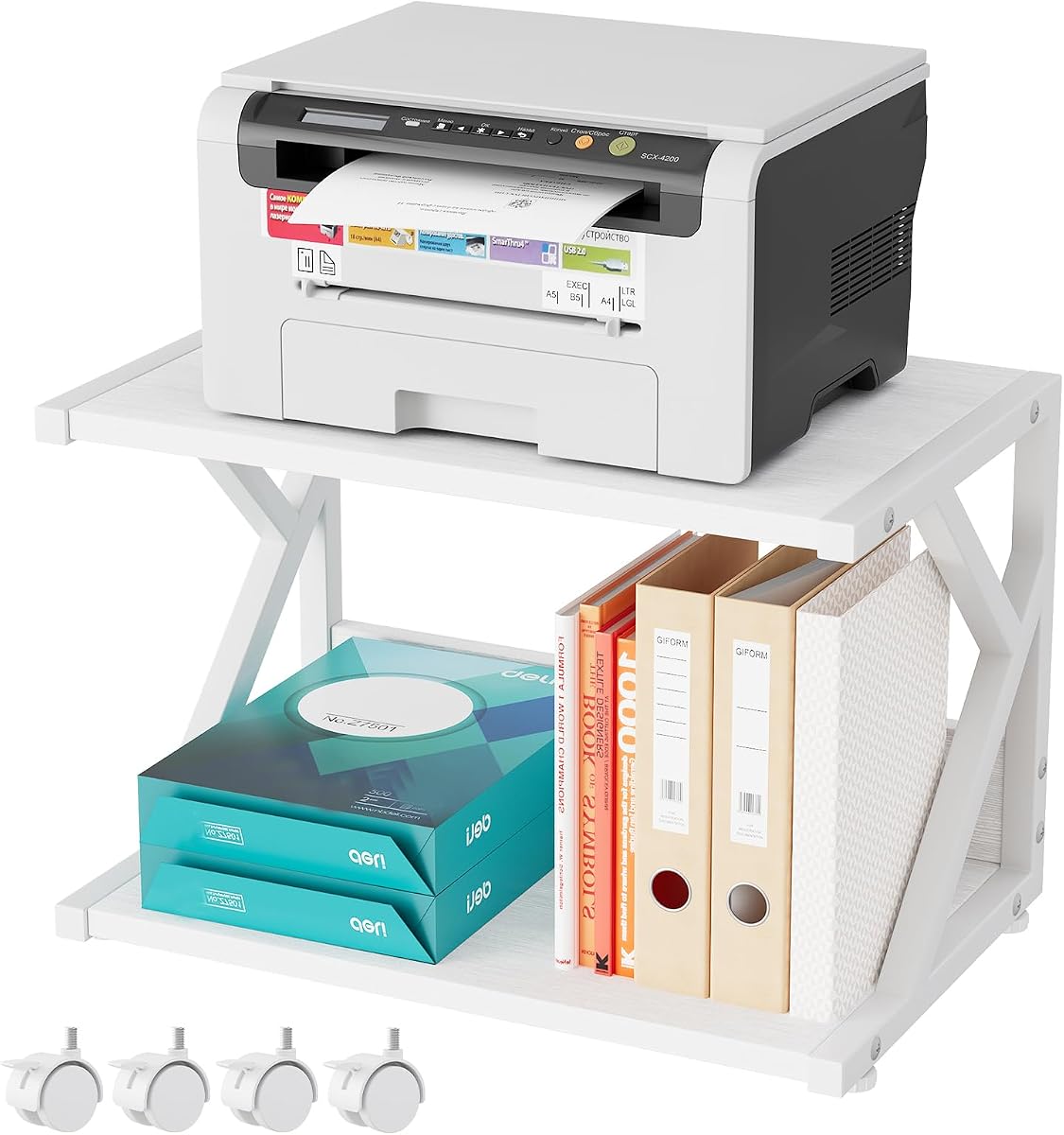
YATINEY Desktop Printer Stand 2-Tier Printer Table
4.7Editor score
Compact Z-shaped design
Affordable price point
Two open storage shelves
Finding the right desktop printer stand can transform a cluttered workspace into a streamlined office environment. These units elevate devices to ergonomic heights while providing essential storage for supplies.
We evaluated ten top rated models based on stability, storage capacity, and ease of assembly to help you find the perfect fit for your needs.
Each pick highlights unique features and potential trade offs so you can choose wisely. Please note that pricing and availability may change over time.
4.7Editor score

4.8Editor score

4.7Editor score
As an Amazon Associate we earn from qualifying purchases.
The following table provides a side by side comparison of all ten selected models to help you quickly identify the best option for your specific workspace requirements.


This highly rated unit stands out as a top contender for modern workspaces needing both height and storage. Its robust construction and thoughtful design features make it a reliable choice for daily office tasks.
We may earn a commission when you buy through this link, at no additional cost to you.
The two tier open shelf design accommodates multiple devices effectively allowing you to keep printers and scanners within easy reach. The fabric drawer adds a layer of privacy for sensitive documents without compromising the open aesthetic.
While the drawer is convenient it is not fully enclosed which might expose contents to dust over time. However the sturdy metal frame and waterproof MDF top ensure longevity and ease of maintenance for long term use.
This stand is ideal for home offices or small corporate desks where maximizing vertical space is crucial. It offers a perfect balance of form and function making it the editor's top choice for most users.
The two tier design allows you to place a primary printer on top while storing accessories or secondary devices below keeping your desk surface clear for work.
Crafted from high quality MDF and a stable metal frame this unit supports up to 44 pounds ensuring it can handle heavy printers without wobbling or tipping over time.
We may earn a commission when you buy through this link, at no additional cost to you.
This model is engineered for stability and durability with a focus on heavy duty performance. It is an excellent choice for users who need to support larger or heavier printers safely.
We may earn a commission when you buy through this link, at no additional cost to you.
The steel frame and metal support bars provide a solid foundation that can hold up to 100 pounds. Rounded corners and anti-slip pads ensure safety and protect your desk surface from scratches during use.
It lacks enclosed storage options which means you may need additional organizers for small supplies. However the simplicity of the design makes it easy to clean and stack if you need more vertical space.
Ideal for industrial or heavy use environments this stand prioritizes function over flair. It is a practical solution for those who need a reliable platform for their printing equipment without extra features.
With a 100 pound capacity this stand is built to handle the heaviest desktop printers and additional equipment without risk of bending or collapsing under load.
Rounded corners and anti-slip pads prevent accidents and protect furniture making it a safe option for households with children or high traffic areas.
We may earn a commission when you buy through this link, at no additional cost to you.
This metal unit offers a unique approach to organization by integrating specific holders for pens and paper trays directly into the frame. It is designed to keep frequently used office items within reach.
We may earn a commission when you buy through this link, at no additional cost to you.
The metal mesh construction ensures long-lasting strength and airflow which can help prevent heat buildup around devices. Adjustable rubber feet allow you to level the stand on uneven surfaces effectively.
The open mesh design might allow dust to settle on stored items more quickly than solid surfaces. Additionally the drawer is compact so it may not fit larger files or supplies.
Best for organized professionals who value quick access to tools this stand helps maintain a tidy workspace. It is a functional choice for offices where organization is a priority.
Included pen holders and a paper letter tray reduce desk clutter by providing dedicated spots for essential office supplies right where you need them.
The steel frame and metal mesh panels offer superior durability and resist rust making it suitable for long term use in various environmental conditions.
We may earn a commission when you buy through this link, at no additional cost to you.
This cart is designed for flexibility allowing you to move your printer easily when needed. The inclusion of wheels makes it a dynamic solution for dynamic office environments.
We may earn a commission when you buy through this link, at no additional cost to you.
The adjustable height feature lets you customize the stand to fit under specific desks or counters. The drawer comes with dividers to help organize office supplies and prevent them from shifting.
Movement on wheels can sometimes lead to slight instability if not locked properly. However the locking mechanism is effective for keeping the unit stationary when in use on a fixed spot.
Perfect for shared offices or workspaces that need reconfiguration this cart offers excellent mobility. It is a smart choice for users who need to adapt their layout frequently.
Locking caster wheels allow you to roll the printer to different locations easily and then secure it in place for stable printing operations.
The adjustable height design ensures you can fit the stand under various desk types making it versatile for different office setups.
We may earn a commission when you buy through this link, at no additional cost to you.
This model combines vintage aesthetics with modern utility making it a great addition to home offices with specific decor styles. The dual rod design provides enhanced stability for heavy devices.
We may earn a commission when you buy through this link, at no additional cost to you.
The foldable drawer is a clever feature that allows you to hide supplies when not in use. Iron pipe frames offer robust support while maintaining a light industrial look that blends well with decor.
Some users may find the assembly slightly more involved due to the pipe structure. The fabric drawer is not water resistant so care should be taken near liquids.
Ideal for design-conscious users this stand brings style to function. It is a perfect match for those who want a printer stand that looks like furniture rather than just a shelf.
The upgraded dual rod support system significantly improves load bearing capacity ensuring your printer stays steady even with heavy operation.
Three tier layout allows for simultaneous use of multiple printers or devices maximizing utility while maintaining a compact footprint.
We may earn a commission when you buy through this link, at no additional cost to you.
This budget-friendly option delivers solid performance without breaking the bank. It features a simple two tier design that is easy to set up and use immediately.
We may earn a commission when you buy through this link, at no additional cost to you.
The non-woven drawer at the bottom provides privacy for files and supplies while keeping the main shelves open for easy access. The chipboard surface is smooth and easy to dust off.
The fabric drawer may not hold up well to heavy or sharp items over time. However for standard office supplies it serves its purpose well and keeps the desk looking neat.
Best for students or home users on a budget this stand offers great value. It is a practical and reliable choice for organizing a workspace without spending a lot.
Detailed manuals and necessary tools make setup effortless taking about 10 minutes so you can start organizing your desk quickly.
Beyond offices this stand works well in kitchens or living rooms for organizing daily items bottles or spices making it a versatile household item.
We may earn a commission when you buy through this link, at no additional cost to you.
This large model is designed for offices with significant storage needs and larger equipment. It offers three distinct compartments to separate supplies effectively from the printer itself.
We may earn a commission when you buy through this link, at no additional cost to you.
The wide design accommodates larger printers comfortably without risking instability. Stacking capability allows you to expand storage vertically if you need even more room in the future.
Its size means it requires more floor or desk space than compact models. Ensure you have the necessary room before purchasing to avoid clutter or crowding issues.
Ideal for busy offices or multi-device setups this stand is a top choice for capacity. It provides ample room for organization and stands up to heavy daily use.
Three compartments allow for organized storage of documents books and supplies keeping your workspace tidy and professional.
The stackable design lets you add more units vertically creating a custom storage tower as your needs grow.
We may earn a commission when you buy through this link, at no additional cost to you.
This unit stands out with a built-in charging station allowing you to power devices right at the printer location. It is perfect for modern offices where devices need constant power.
We may earn a commission when you buy through this link, at no additional cost to you.
The inclusion of USB ports and a standard outlet reduces cable clutter by centralizing power sources. The industrial style design adds a touch of character to any office environment.
The charging cables are fixed which limits flexibility compared to using a power strip. Also the shelf size is compact so very large printers may not fit well.
Best for tech-heavy environments this stand simplifies power management. It is an excellent choice for small offices or home setups where convenience is key.
The built-in outlet and USB ports allow you to charge phones tablets or other devices without reaching across the desk for power.
Smaller dimensions make this stand ideal for corners or tight spaces where every inch of floor space counts.
We may earn a commission when you buy through this link, at no additional cost to you.
This stand features a unique Z-shaped design that maximizes space while adding a modern touch to your office. It offers two tiers of storage for a balanced look.
We may earn a commission when you buy through this link, at no additional cost to you.
Each tier can support up to 44 pounds ensuring that both shelves are reliable for printers or heavy books. The minimalist design allows it to fit into various interior styles seamlessly.
The lack of enclosed drawers means dust may settle on open items. However the easy to clean surface makes maintenance straightforward and quick.
Best for those who prefer open shelving this stand is a strong contender. It is perfect for users who want a clean aesthetic with reliable performance.
The Z-shape allows you to utilize corner space efficiently while maintaining an open and airy feel in the room.
Quality particleboard and metal frame construction ensure long term use and resistance to daily wear and tear.
We may earn a commission when you buy through this link, at no additional cost to you.
This stand offers a versatile option with the choice between wheels and adjustable pads for different needs. The MDF wood surface is waterproof and resistant to scratches.
We may earn a commission when you buy through this link, at no additional cost to you.
The white finish gives it a clean modern look that works well in bright offices. Two tier design increases storage capacity allowing you to organize supplies on the bottom tier.
White surfaces can show dirt and scuffs more easily than darker colors. However the scratch resistance helps keep the surface looking new with proper care.
Ideal for those who need flexibility in movement this stand is a great choice. It is a practical option for home offices and small workspaces alike.
You can choose to install wheels for mobility or adjustable pads for stability depending on your specific floor and usage requirements.
The waterproof and scratch-resistant MDF ensures that the stand remains durable and easy to clean after accidental spills or spills.
We may earn a commission when you buy through this link, at no additional cost to you.
Selecting the right desktop printer stand involves considering size stability storage and aesthetic alignment with your workspace needs.
Measure your available space carefully to ensure the stand fits under your desk or on your countertop without crowding. Check the top platform dimensions to confirm it accommodates your printer model securely.
Always verify the width and depth against your device specifications to avoid instability or overhang issues.
Ensure the stand can support the weight of your printer plus any additional accessories like toner or paper. Heavier units require sturdy frames to prevent wobbling or tipping.
Look for models rated at least 10 to 20 pounds higher than your printer's actual weight.
Metal frames offer superior durability and stability compared to wood or plastic. MDF wood provides a smooth surface but may be less resistant to moisture.
Choose materials that match your environmental conditions and cleaning requirements.
Determine if you need open shelves for quick access or closed drawers for privacy and dust protection. Some models include pen holders or paper trays for added convenience.
Select storage types that match your typical office clutter and organization style.
Some stands require tools and detailed instructions while others are tool-free. Consider your own comfort level with assembly and the time you want to spend setting up.
Opt for models with clear instructions if you plan to set it up quickly.
Choose a finish and style that complements your existing office decor whether industrial modern or rustic. Aesthetics matter for maintaining a professional and welcoming workspace.
Match colors and textures to your desk and wall for a cohesive look.
If you need to move the printer frequently look for stands with caster wheels. Ensure they have locking mechanisms to keep the stand stable during use.
Decide based on how often you rearrange your office layout.
Non-slip feet and rounded corners prevent accidents and protect your furniture from scratches. These features are essential for homes with children or pets.
Prioritize safety elements to avoid damage and injury.
Start by clearing your workspace and unpacking all parts. Follow the manual step by step using the provided tools to ensure a secure assembly.
Place the stand on a level surface and attach the printer. Ensure the weight is centered to prevent tipping or imbalance during printing cycles.
Regularly clean the surface with a damp cloth to remove dust. Check all connections and bolts periodically to maintain stability over time.
Most stands can hold between 38 and 100 pounds depending on their design and materials. Always check the product specifications to confirm capacity for your specific device.
Yes many models are designed with adjustable height or low profiles to fit under desks. Ensure you have enough clearance height for both the stand and the printer.
Metal and sturdy MDF are the most durable options. Metal provides maximum stability while MDF offers a clean finish that is easy to clean and maintain.
Some models include drawers for storage while others have open shelves. Check the product details to find one with the storage features you need.
Most stands are designed for tool-free assembly or require basic tools. The process usually takes about 10 to 20 minutes for a single person.
Some models are stackable to increase storage height. Ensure you verify compatibility and weight limits before stacking units.
We reviewed ten high quality stands offering a range of features from storage to mobility. Each option was selected for its balance of price function and design.
Prioritize stability and storage based on your specific workspace needs. A well chosen stand will transform your office and improve workflow efficiency.
Always verify current pricing and availability before purchasing to ensure you get the best value for your specific requirements.