
Dell Wired Mouse MS116
4.6Editor score
Plug and play
Wired reliability
Budget friendly
This guide compares the top external mouse for Dell laptop users. We evaluate wireless options, ergonomics, DPI settings, battery life, and compatibility to
Finding the right external mouse for your Dell laptop can transform your productivity and comfort. Whether you need precision for design work or simplicity for everyday tasks, the right peripheral makes a significant difference in your daily workflow and long-term wrist health.
We have carefully selected ten top-rated mice that pair seamlessly with Dell systems. Our analysis considers connectivity types, battery longevity, ergonomic design, and sensor accuracy. This list covers diverse needs from budget-friendly options to advanced gaming and productivity tools.
Each pick highlights unique strengths and potential trade-offs to guide your decision. Note that prices and availability change frequently on retail platforms. Check the latest offers before purchasing to ensure you get the best value for your specific Dell laptop configuration.
4.6Editor score

4.9Editor score

4.6Editor score
This table provides a side-by-side comparison of all ten selected mice. Review the key specifications such as connectivity type, battery life, sensor resolution, and unique features to quickly identify the model that aligns best with your Dell laptop usage patterns.






The Dell Advanced Wireless Compact Mouse MS510 stands out as the top choice for Dell laptop owners. It holds an impressive 4.9 rating reflecting strong user satisfaction. Its dual-mode connectivity and long battery life make it ideal for daily productivity tasks.
We may earn a commission when you buy through this link, at no additional cost to you.
You can switch between 2.4GHz wireless and Bluetooth 5.0 effortlessly. The Swift Pair feature allows instant connection without navigating settings menus. The 1600 DPI sensor ensures smooth cursor movement even on high-resolution displays. Seven buttons provide customizable shortcuts for common actions.
While the battery life is excellent, the device is not universally perfect for all users. Large-handed users might find the compact size slightly limiting for extended sessions. Additionally, full optimization requires the Dell Display and Peripheral Manager application.
If you prioritize seamless integration with your Dell ecosystem, this mouse is the clear winner. It balances performance, battery longevity, and comfort effectively. For general office work and travel, it delivers a reliable premium experience without high cost.
You can connect via 2.4GHz wireless or Bluetooth 5.0 depending on your setup needs. This flexibility ensures compatibility with almost any PC or laptop you own.
Work for up to 36 months on a single battery which is three times longer than previous models. This reduces the hassle of frequent replacements or recharging.
We may earn a commission when you buy through this link, at no additional cost to you.
The Dell Wireless Gaming Mouse MS5120W offers high performance with its 4000 DPI sensor. It is ideal for users who need precision for design work or gaming while still using a Dell laptop. The design supports both wireless and Bluetooth connections smoothly.
We may earn a commission when you buy through this link, at no additional cost to you.
Customization is a strong point with the Dell Peripheral Manager software. You can adjust button functions to suit your workflow or gaming style. The battery life matches the standard Dell model offering up to 36 months on a single set of batteries.
Some users might find the gaming aesthetic unnecessary for standard office use. The sensor sensitivity is high which may require adjustment for casual browsing. However, the Advanced Exchange Service provides peace of mind for long-term use.
This mouse is perfect if you need versatility between work and entertainment. It delivers robust performance and reliable connectivity. For Dell users wanting extra features beyond basic navigation this is a solid upgrade.
The 4000 DPI sensor tracks smoothly on most surfaces ensuring accurate cursor control. This is beneficial for detailed tasks like photo editing or spreadsheet management.
Dell offers a one-year advanced exchange service for faulty units within three years. This ensures quick replacements without long downtime or repair waits.
We may earn a commission when you buy through this link, at no additional cost to you.
The Dell Wired Mouse MS116 is the most affordable option on this list. It provides essential functionality without any complex features or wireless components. Users appreciate its straightforward plug-and-play nature for immediate usability.
We may earn a commission when you buy through this link, at no additional cost to you.
Since it relies on a wired connection there is no need to worry about battery replacements. The cable ensures a stable link to your Dell laptop which is helpful in environments with interference. It is perfect for stationary desks or kiosks.
The main drawback is the lack of mobility due to the attached cable. You are restricted by the cord length which can limit movement around the workspace. It also occupies a USB port continuously which might be an issue for limited port laptops.
For budget-conscious users or those who prioritize simplicity this mouse is ideal. It performs basic tasks reliably and requires no setup. Choose this if you need a functional replacement that is easy to use and cheap to replace.
Simply connect the USB cable to your laptop and start using the mouse immediately. No drivers or software installation is required for basic operation.
Wired connections prevent signal dropouts often found with wireless devices. This ensures consistent performance during critical work sessions.
We may earn a commission when you buy through this link, at no additional cost to you.
The VssoPlor Wireless Mouse offers a slim and stylish profile ideal for travelers. It combines a black and gold design with functional wireless performance. Users value its quiet clicks which make it suitable for shared workspaces or libraries.
We may earn a commission when you buy through this link, at no additional cost to you.
The intelligent sleep mode conserves battery power when the mouse is not in use. You can achieve reliable connections up to 10 meters away from your device. The compact form factor allows it to slip easily into laptop bags or pockets.
However, it lacks advanced features like high DPI customization or extra buttons. The sensor is basic and works well for general tasks but not for precision work. Some users may find the slim profile less ergonomic for extended use.
If you need a portable and affordable backup mouse this model fits well. It is great for students or business travelers who need reliable wireless functionality. Prioritize this if style and portability are more important than advanced features.
The mouse enters auto sleep mode after five minutes of inactivity to save battery. It wakes instantly when you move it again saving power without disrupting workflow.
Whisper-quiet clicks reduce noise distractions in open offices or home settings. This helps maintain focus while working in quiet environments.
We may earn a commission when you buy through this link, at no additional cost to you.
The Logitech M510 Full Size is praised for its ergonomic design and comfort. It supports long work sessions with rubber grips and a contoured shape. The full-size build accommodates larger hands better than compact alternatives effectively.
We may earn a commission when you buy through this link, at no additional cost to you.
A standout feature is the side-to-side scrolling which helps navigate spreadsheets easily. You can also program buttons for specific shortcuts like full-screen toggling. The Unifying receiver stays in your laptop so you never lose the connection tool.
While comfortable this mouse is not ideal for tight travel bags due to its bulk. It also requires software installation to unlock all programmable features fully. Users without SetPoint software may find it less customizable out of the box.
Choose this if you spend hours daily at a desktop or laptop station. It offers premium comfort and productivity tools that justify the higher price. For users prioritizing wrist health and efficiency this is a top-tier choice.
Side-to-side scrolling allows you to move through wide documents efficiently. This feature saves time compared to manual scrolling methods.
The tiny receiver connects to up to six compatible Logitech devices. You can manage multiple peripherals with a single USB port seamlessly.
We may earn a commission when you buy through this link, at no additional cost to you.
The Logitech M185 Compact is a reliable choice for casual users and travelers. It fits well in small bags and offers decent performance for everyday tasks. The ambidextrous shape allows use by both right and left-handed individuals comfortably.
We may earn a commission when you buy through this link, at no additional cost to you.
Battery life is solid for a year which matches expectations for budget wireless mice. The nano receiver stores inside the mouse body when not in use preventing loss. It connects easily without requiring driver installation or software setup.
However, it lacks advanced ergonomic support for long-term heavy use. The scroll wheel is basic and does not support advanced gestures. Larger hands might find the shape too small for comfortable daily sessions.
For budget travelers or students this mouse provides essential functionality. It works well with most systems and offers reliable performance. Choose it if you need a simple and dependable wireless solution for light computing needs.
This mouse works with Windows Mac Chrome OS and Linux systems easily. It offers broad support across different operating environments without issues.
Its small size and light weight make it easy to carry anywhere. The receiver hides inside the mouse so you lose nothing during transport.
We may earn a commission when you buy through this link, at no additional cost to you.
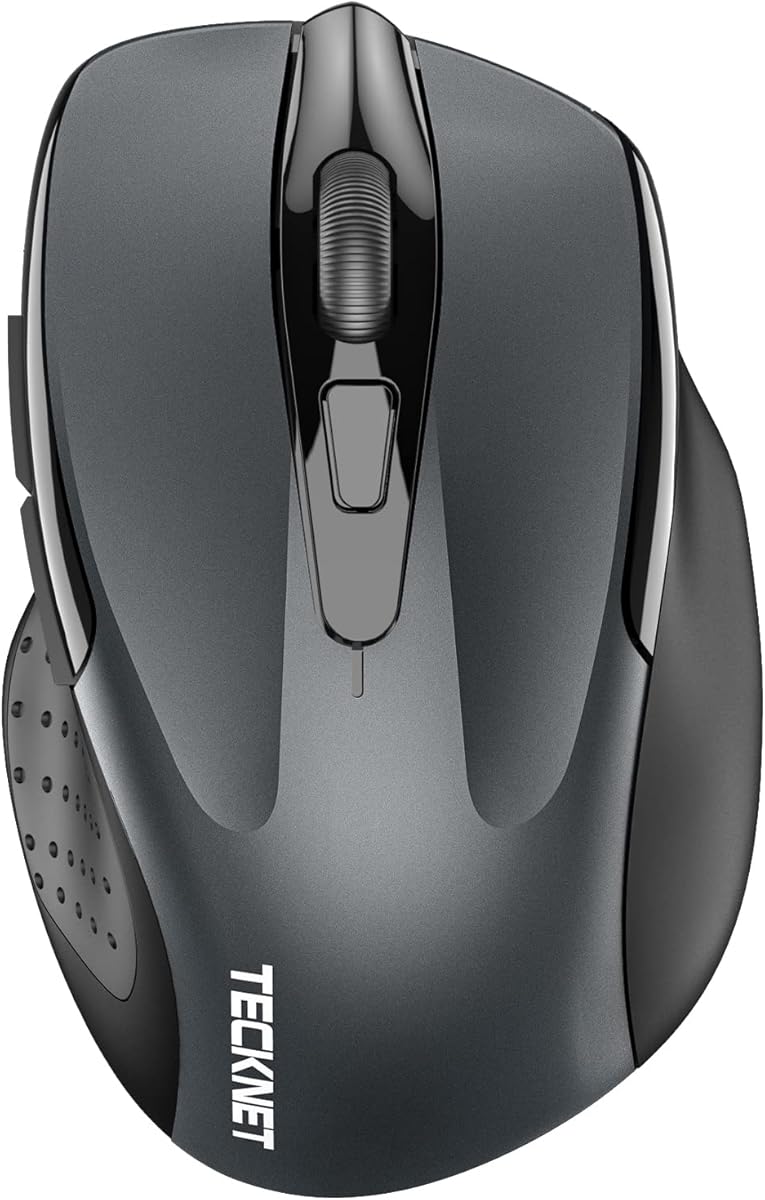
The TECKNET Compact Ambidextrous mouse offers a vibrant Mint Green color for personal style. It is designed for small to medium hands providing a good fit for younger users. The compact shape makes it highly portable for daily commutes.
We may earn a commission when you buy through this link, at no additional cost to you.
You can switch between three DPI levels to adjust speed for different tasks. Quiet clicks ensure that typing noise does not disturb colleagues nearby. The wireless connection remains stable within standard office distances up to 49 feet.
Some users might find the color too bright for conservative work environments. The shape is simple and lacks significant palm support for extended sessions. However, the price point makes it a good entry-level wireless option.
If you value aesthetics and portability this mouse is a great pick. It is ideal for students or casual users who want a touch of color. For budget-friendly wireless performance this option delivers reliable functionality.
Buttons are designed to minimize noise while maintaining tactile feedback. This helps keep the environment calm during work or study sessions.
Three DPI levels let you choose between precision and speed easily. You can switch based on whether you are browsing or working on detail.
We may earn a commission when you buy through this link, at no additional cost to you.
The Logitech M330 Silent Plus is specifically designed for quiet work environments. It reduces click noise by over 90 percent which benefits shared offices and libraries. The ergonomic shape supports the right hand effectively for long sessions.
We may earn a commission when you buy through this link, at no additional cost to you.
Battery life is excellent with up to 18 months on a single AA battery. You can enable auto-sleep mode to conserve energy when not in use. The optical tracking ensures smooth cursor control on various surfaces like wood or metal.
Since it is right-handed only left-handed users will not find it suitable. The price is higher than basic models but justifies the silent technology included. Users sensitive to noise or needing quiet tools will appreciate the feature set.
Choose this if you work in quiet zones or dislike clicking sounds. It balances comfort and silence well for standard office tasks. This is a premium pick for noise-free productivity and reliable performance.
SilentTouch reduces click sound while maintaining full performance feedback. This creates a quieter workspace without compromising on usability.
Up to 18 months of battery life means fewer interruptions for changes. Smart sleep mode further extends usage between battery replacements.
We may earn a commission when you buy through this link, at no additional cost to you.
The TECKNET Wireless Mouse BT 5.0 supports dual device connectivity for multitasking. You can switch between two devices with a slide of a button. This is excellent for users working across a laptop and a desktop simultaneously.
We may earn a commission when you buy through this link, at no additional cost to you.
It offers six adjustable DPI levels including up to 4800 DPI for precision work. The silent design helps reduce noise in shared environments. It works well with Windows macOS and Linux systems for broad versatility.
Some side buttons may not function on macOS which limits some features. The battery life depends on usage habits and the sleep technology included. Users need to insert two AAA batteries which is a standard requirement.
For multi-device workflows this mouse is a powerful tool. It offers high performance and silent operation at a reasonable price. Prioritize this if you need to control multiple systems with one peripheral.
Connect to two devices at once via Bluetooth or USB A. Switch seamlessly with a button slide for efficient multitasking across screens.
Choose from 6 DPI settings to match your workflow needs. You can adjust from 800 to 4800 for precise control or browsing.
We may earn a commission when you buy through this link, at no additional cost to you.
The TECKNET Wireless Mouse Rechargeable eliminates the need for disposable batteries. It charges quickly in about two hours and provides three months of use. This makes it a great eco-friendly alternative to standard battery-powered mice.
We may earn a commission when you buy through this link, at no additional cost to you.
It supports both Bluetooth 5.0 and 2.4G for flexible connectivity options. The silent clicks ensure quiet performance suitable for libraries or offices. You can customize sensitivity with six DPI levels for different tasks.
Connection stability may decrease when the battery is low which requires monitoring. You must remember to charge it periodically to avoid interruptions. For daily users the convenience of charging outweighs the minor inconvenience of cable management.
For environmentally conscious buyers this mouse offers great value. It combines modern wireless tech with sustainable power. Choose this if you prefer reusable power and reliable silent performance.
Avoid disposable battery waste with an internal rechargeable battery. It charges quickly and supports long usage without replacements.
Enjoy noiseless clicks that fit any quiet work environment. This feature helps you stay focused without disturbing others.
We may earn a commission when you buy through this link, at no additional cost to you.
Choosing the right external mouse for your Dell laptop depends on your specific needs. We have identified key factors to help you select the best model for your workspace and usage style.
Wireless mice offer freedom of movement while wired mice ensure stability without charging. Choose Bluetooth if your Dell laptop has limited USB ports or a dongle for maximum compatibility. Consider your environment to decide if a wire is acceptable.
Wireless is best for mobility and wired is best for uninterrupted power.
Long battery life reduces maintenance for daily users. Look for models lasting over 12 months or rechargeable options to save waste. This is crucial for travel where charging ports may be unavailable.
Longer battery life means fewer interruptions and more reliability.
Comfort is essential to prevent wrist strain during long sessions. Choose shapes that fit your hand size such as palm or claw grips. Right-handed users may prefer contoured shapes while ambidextrous suits left-handed users.
Prioritize ergonomic shapes for long-term comfort and health.
DPI determines cursor speed and accuracy for your tasks. Higher DPI is useful for large monitors or design work while standard DPI works for browsing. Ensure the sensor performs well on your typical desk surfaces.
Higher DPI helps with precision work while lower DPI suits casual use.
Extra buttons allow shortcuts for common apps or browser actions. This improves workflow speed for advanced users. Check if the software supports your operating system before purchasing.
Customizable buttons enhance productivity for frequent multitaskers.
Ensure the mouse works with your Dell laptop OS whether Windows or Linux. Some advanced features may not work on Mac or Chrome OS. Compatibility ensures you get all advertised functionality.
Check OS compatibility to avoid feature limitations.
If you travel frequently choose a compact and lightweight design. A case or receiver storage adds value for portability. Larger mice may be too bulky for backpacks.
Compact designs are best for frequent travelers.
Decide on a budget that balances features and affordability. Look for warranties offering exchange services to protect against defects. A good warranty adds security for long-term investment.
Balance price with warranty coverage for best value.
Start by pairing the mouse with your laptop using Bluetooth or the USB receiver. For wireless models ensure batteries are fresh or charged before use. Place the mouse on a flat surface for optimal tracking.
Customize settings using the manufacturer software if available. Adjust DPI and button shortcuts to match your workflow. This improves efficiency and reduces repetitive strain during daily tasks.
Clean the sensor regularly to maintain performance. Use a soft cloth to wipe the exterior and sensor lens. Store the mouse in a safe place when not in use to prevent damage.
Wireless mice offer more freedom and reduce cable clutter on your desk. However, wired mice provide constant power and zero latency. Choose wireless for mobility and wired for stability.
Enable Bluetooth in your Windows settings and put the mouse in pairing mode. Select the device from the list and click connect. Once paired it will work immediately without extra drivers.
A DPI between 1000 and 1600 is ideal for general browsing and office tasks. Higher DPI is better for large monitors but may be too fast for small screens. Adjust based on your comfort.
Yes, most modern mice are compatible across Windows and Mac. However, some features may not work without specific drivers. Check compatibility before purchasing to avoid issues.
Lag can occur due to low battery or interference from other devices. Try replacing the battery or switching to a different USB port. Also ensure the mouse is close to the receiver.
This depends on usage and battery type but typically once a year for standard wireless models. High-performance mice may need replacements more often. Monitor your battery indicator if available.
The Dell Advanced Wireless Compact Mouse MS510 stands out as the top overall choice for most users. It offers seamless connectivity and exceptional battery life for daily productivity. For gamers or power users the MS5120W provides higher precision and customization.
Budget buyers will appreciate the Dell Wired Mouse MS116 for its reliability and low cost. For ergonomic comfort the Logitech M510 provides premium support for long work sessions. Consider your specific needs and workspace before finalizing your purchase.
Remember that prices and availability change frequently on retail platforms. Check the latest deals before buying to ensure you get the best value. Select a mouse that fits your workflow and budget for the best experience.