
HP 14 inch Laptop
4.5Editor score
Intel N150 Processor
4GB DDR5 RAM
14 inch Display
Finding the right laptop for Zoom calls requires balancing performance, display quality, and camera capabilities. Modern video conferencing demands hardware that can handle HD video streams without lag or overheating during long meetings. This guide explores the best options available to ensure you stay professional and connected.
We evaluated each product based on processor speed, RAM capacity, display brightness, and microphone quality. Our analysis includes dedicated laptops and complementary accessories like webcams and lighting kits that enhance your video presence. Every selection aims to deliver reliable performance for remote work and online collaboration tasks.
Each pick highlights specific strengths such as battery life, port selection, or ergonomic design for comfort. Prices and availability can change frequently, so verify current details before purchasing. Read on to discover which device fits your workflow and budget while keeping your virtual meetings crisp and clear.
4.5Editor score

5.0Editor score
4.6Editor score
As an Amazon Associate we earn from qualifying purchases.
The following table provides a side by side comparison of all ten products selected for this guide. Each entry lists key specifications to help you identify the device or accessory that best matches your specific requirements for video conferencing and remote work environments.





The HP 14 inch Laptop serves as a solid entry point for those needing a reliable device for virtual meetings. It offers a balanced mix of essential features without a high price tag. Users appreciate its lightweight build which makes it easy to move between rooms or offices.
We may earn a commission when you buy through this link, at no additional cost to you.
Equipped with the Intel N150 processor, this model handles standard video calls efficiently. The 4GB DDR5 RAM ensures smooth multitasking between your meeting app and web browser. The 14 inch non touch display provides clear visuals with an anti glare coating that reduces eye strain during long sessions.
While the storage is limited to 128GB, the included 1TB Cloud Storage helps mitigate this constraint for document needs. The connectivity options include USB 3.0 and HDMI ports allowing you to connect external monitors or peripherals easily. This flexibility supports various remote work setups without extra adapters.
This laptop is ideal for students or professionals who prioritize portability and cost over high end performance. If your workflow mainly involves video conferencing and basic productivity tasks this device will meet your needs comfortably. It represents a practical choice for budget conscious buyers looking for functional reliability.
Weighing just 3.24 lbs with a slim profile it fits easily in backpacks for daily commutes or travel.
Multiple ports including USB-C and HDMI allow seamless connection to projectors and external displays during presentations.
We may earn a commission when you buy through this link, at no additional cost to you.
Good lighting is crucial for professional video calls and this ring light kit addresses common issues with poor room lighting. It clips directly onto your monitor screen providing a direct light source that eliminates harsh shadows on your face. The setup requires no complex mounting or tools making it accessible for any user.
We may earn a commission when you buy through this link, at no additional cost to you.
The LED lamp beads deliver consistent brightness across your face without creating glare or hot spots. You can adjust the color temperature to match your environment from warm to cool light which helps you look natural on camera. Five brightness levels allow fine tuning based on time of day and room conditions.
Powered by USB it draws energy from your laptop or charger removing the need for wall outlets. This feature enhances portability for users who move between different workspaces or use mobile power supplies. The compact design ensures it does not obstruct your view of the screen during meetings.
This accessory is perfect for anyone struggling with dim or uneven lighting in their home office. It significantly improves video quality for less than the cost of a new camera. Simple functionality and adjustability make it a reliable addition to any video conferencing setup.
The circular design ensures soft light wraps around your face removing shadows that distract during professional calls.
Use any available USB port to power the light avoiding the need for additional cables or adapters.
We may earn a commission when you buy through this link, at no additional cost to you.
The HP Everyday Slim Laptop stands out for its enhanced video features designed specifically for virtual meetings. It includes a True Vision 720p HD camera with temporal noise reduction which ensures you look clear even in lower light conditions. Dual array microphones capture your voice clearly while minimizing background noise distractions.
We may earn a commission when you buy through this link, at no additional cost to you.
Its slim profile makes it easy to carry around and the long battery life supports all day productivity without frequent charging. The full size keyboard includes a dedicated Microsoft Copilot key for quick access to AI tools that can assist in drafting emails or summaries. Multi-touch navigation adds convenience for quick interactions.
Windows 11 integration provides a familiar interface that supports popular meeting apps like Zoom or Teams without compatibility issues. While storage is limited the system is optimized for smooth daily operations. Users benefit from Microsoft 365 included which covers essential productivity needs for work or school.
This laptop is a top choice for those needing a reliable and portable device for frequent video conferencing. The specific enhancements for meeting clarity and sound quality offer value beyond standard budget models. It combines practical design with functional features for a seamless professional experience.
Camera noise reduction and dual mics work together to improve audio visual clarity during important client calls.
The full size keyboard with Copilot key speeds up workflow tasks and provides comfortable typing for long sessions.
We may earn a commission when you buy through this link, at no additional cost to you.
This NIMO laptop offers a significant performance boost with 16GB of RAM allowing you to run multiple browser tabs and apps simultaneously. The 512GB SSD ensures quick file access and storage space for large documents or media files. Its Intel N150 processor handles 1080p video calls without lag making it reliable for intensive tasks.
We may earn a commission when you buy through this link, at no additional cost to you.
The 15.6 inch Full HD display provides ample screen real estate for sharing documents during group meetings. A 175 degree hinge allows the screen to lay flat facilitating easy viewing across tables. Connectivity is robust with seven full ports including USB-C and HDMI eliminating the need for dongles.
Fingerprint unlock and hardware encryption protect your data during public or shared use scenarios. The battery supports over eight hours of continuous use ideal for travel or remote work days. USA assembly and a two year warranty provide confidence in long term durability and support.
Ideal for power users and students this model delivers stability and speed for complex workflows. The combination of storage RAM and port availability makes it a versatile workhorse. It is a strong investment for those needing consistent performance over several years.
Seven built in ports let you connect drives monitors and mice without carrying extra adapters everywhere.
Fingerprint unlock and fTPM encryption keep your work files secure in public coffee shops or shared offices.
We may earn a commission when you buy through this link, at no additional cost to you.
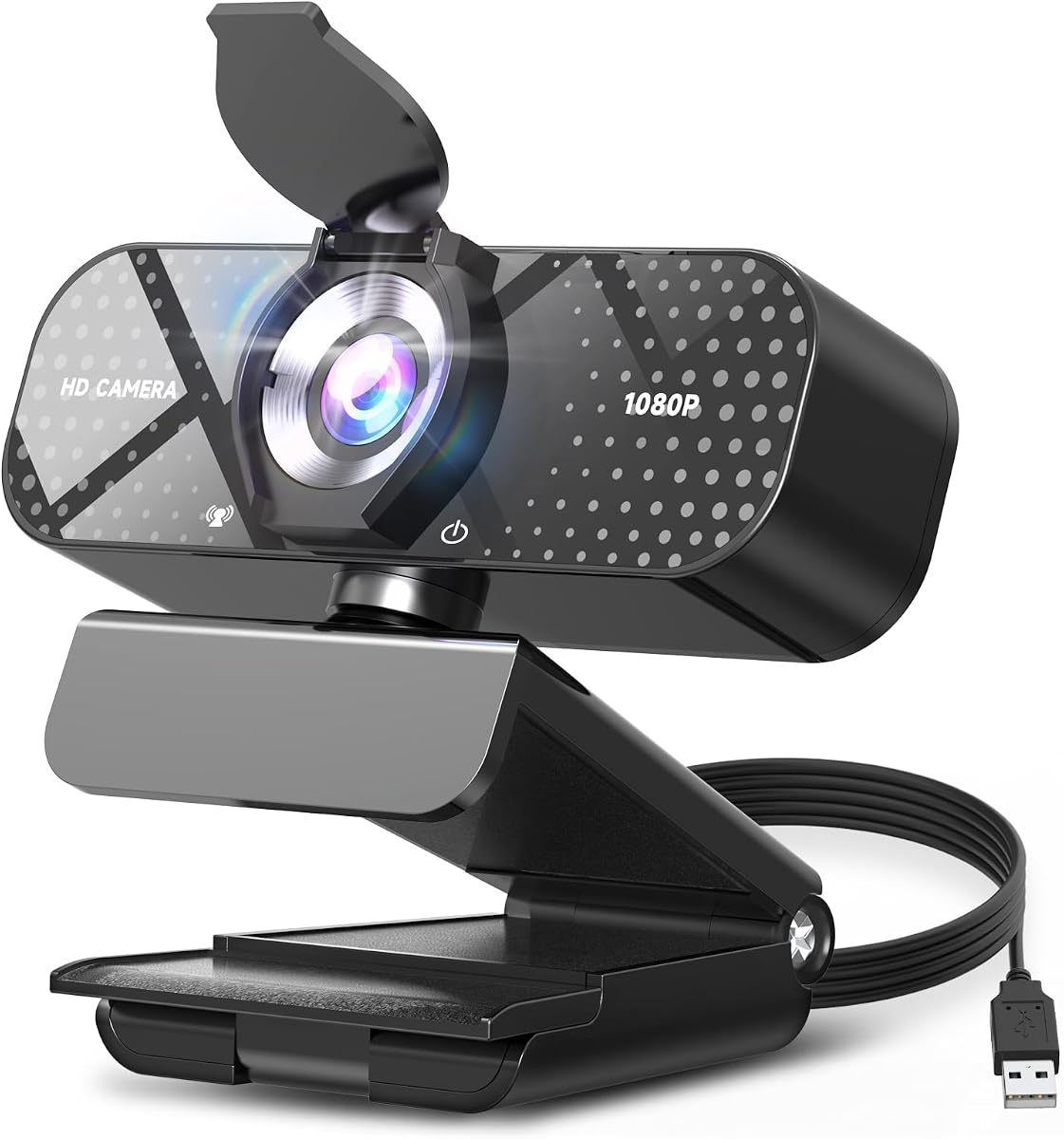
Upgrading to an external webcam like this TRAUSI model can drastically improve video quality for your calls. The 1080P full HD sensor captures sharp images at thirty frames per second ensuring smooth motion. The wide angle lens lets you include more of your workspace or room in the frame easily.
We may earn a commission when you buy through this link, at no additional cost to you.
Noise canceling technology filters out background sounds so your voice remains clear during conversations. Automatic light correction adjusts brightness and color dynamically helping you look good in dim or bright rooms. A physical privacy cover gives peace of mind when the camera is not active during work hours.
Plug and play compatibility means it works with USB 2.0 to 3.1 without needing drivers. This simplicity makes it easy to set up on laptops desktops or even mobile devices with adapters. The eco friendly design and durable build promise long term use with minimal waste.
For users unsatisfied with built-in laptop cameras this webcam offers a cost effective way to elevate your profile. The features align well with professional needs for clarity and security. It is a recommended upgrade for anyone seeking higher fidelity in virtual meetings.
Integrated noise reduction ensures your voice is the focus even when you are in a busy environment.
Slide the cover over the lens quickly to block video when you step away from your desk.
We may earn a commission when you buy through this link, at no additional cost to you.
This desk ring light provides uniform illumination using edge-lit technology that reduces harsh glare on your face. With a high color rendering index it ensures your skin tones appear true to life on camera. The light is designed to reduce eye strain during extended periods of video work.
We may earn a commission when you buy through this link, at no additional cost to you.
You can adjust the color temperature across three settings and ten brightness levels to suit any environment. The metal base is sturdy and non slip preventing it from moving during use. Height adjustment from twenty-two to thirty-two inches allows you to find the perfect angle for lighting.
Omni-directional rotation lets you direct light exactly where needed whether you are seated or standing. It also includes a phone holder making it useful for social media or mobile video calls. USB power ensures it can run on any standard adapter or laptop port.
Ideal for home offices this light transforms dark corners into professional recording spaces. The combination of color accuracy and flexibility offers great value for streamers or remote workers. It serves as both a functional lamp and a dedicated video tool.
A CRI of 97.8 ensures that colors on your face and in your background look natural and professional.
Rotate the head in any direction to focus light where it is needed most for best results.
We may earn a commission when you buy through this link, at no additional cost to you.
This compact ring light is designed to clip onto your monitor providing a direct source of soft light. The curved coating helps reduce glare while improving brightness compared to flat lampshades. It is a cost effective solution for improving your look during online classes or meetings.
We may earn a commission when you buy through this link, at no additional cost to you.
It features over 95 CRI ensuring accurate color reproduction in your videos. You can cycle through warm mixed and cold light modes using the switch. Ten dimming levels allow you to match the brightness to your room without over lighting.
Installation is simple requiring only a clamp to secure it to the monitor edge. The light is portable and easy to move between screens or devices as needed. Its small footprint ensures it does not block your view or take up desktop space.
Perfect for beginners or those on a tight budget this light offers solid performance for the price. It enhances video quality significantly compared to relying solely on room overheads. A reliable tool for improving professional presence with minimal investment.
The thicker coating on the curved shade provides more even light spread across your face without hot spots.
Toggle between modes quickly to find the lighting that best suits your room lighting and time of day.
We may earn a commission when you buy through this link, at no additional cost to you.
This HP laptop blends professional functionality with a stylish pale rose gold finish that stands out. It runs Windows 11 Home smoothly and includes a full year of Office 365 for document and email needs. The Intel Quad-Core processor handles daily business tasks and video calls with efficiency.
We may earn a commission when you buy through this link, at no additional cost to you.
A 14 inch LED screen with anti glare coating keeps text clear during long document reviews. Ports include USB-C USB-A HDMI and SD card reader offering good peripheral support. The included earphones allow you to join calls without external audio gear.
While storage is modest the system is tuned for quick response times. Connectivity via Wi-Fi and Bluetooth keeps you linked to networks and peripherals easily. The design is suitable for students or small business owners needing a reliable daily driver.
It represents a solid balance of aesthetics and utility for light business work. The inclusion of office tools and audio gear adds value for those setting up a new workspace. A practical choice for those who prefer a polished look.
One year of Office 365 lets you create and edit documents immediately after unboxing without extra costs.
Included earphones provide a quick way to join calls without hunting for a headset or mic.
We may earn a commission when you buy through this link, at no additional cost to you.
This latest edition features a dedicated Copilot AI key for easy access to smart productivity tools. It weighs just 3.24 lbs making it highly portable for travel or commuting. The True Vision camera with noise reduction helps maintain clarity during virtual meetings in various lighting conditions.
We may earn a commission when you buy through this link, at no additional cost to you.
Storage includes a 128GB SSD paired with 1TB cloud storage keeping essential files accessible. Battery life supports up to eleven hours of video playback reducing the need for chargers. The natural silver chassis adds a modern touch to its practical utility.
Ports include USB-C and HDMI enabling connections to monitors and docking stations. Multi-touch navigation aids quick tasks on the go. It is designed for those needing a thin light device for school or remote work.
While performance is adequate for basic tasks it is best for light usage. The AI features and cloud options provide flexibility for modern work styles. A good fit for those prioritizing weight and mobility over raw power.
The Copilot key offers one touch access to AI tools helping streamline your daily workflow and tasks.
Up to eleven hours of playback ensures you stay productive all day without frequent recharging breaks.
We may earn a commission when you buy through this link, at no additional cost to you.
This dual lamp setup provides brighter and more even lighting than single bar models. It offers a professional podcast style effect that enhances your appearance on camera. You can control it via touch or remote giving you flexibility during recording or meetings.
We may earn a commission when you buy through this link, at no additional cost to you.
Rotatable design allows horizontal or vertical installation to suit different monitor setups. The adjustable size fits most devices ensuring it remains secure during use. Sponge pads protect your screen from scratches while holding the light in place.
Three color modes and ten brightness levels let you tailor the atmosphere to your environment. The kit includes stands adapters and wire ties for organized cable management. It can also serve as a desk lamp or key light for streaming.
Ideal for content creators this dual design covers more area for even illumination. The remote control adds convenience for adjusting light without interrupting your session. A versatile tool for improving professional video quality.
Two light bars provide wider coverage than single lamps eliminating shadows more effectively.
Change settings with the remote so you do not need to reach up during active calls.
We may earn a commission when you buy through this link, at no additional cost to you.
Selecting the right device for video conferencing involves evaluating several key aspects that directly impact your meeting experience. This guide outlines essential factors to consider to ensure you make an informed decision.
The processor handles the data streams required for video and audio during calls. A faster CPU ensures smooth performance without freezing or lag when switching between apps. Look for modern multi-core processors to support HD video seamlessly.
Prioritize Intel N series or higher for reliable video conferencing performance.
RAM determines how many applications you can run simultaneously. Video conferencing apps often run alongside browsers and document editors. Sufficient memory prevents slowdowns during critical meetings.
Aim for at least 8GB of RAM for comfortable multitasking.
The built-in webcam defines how clear you appear to others. Look for HD resolutions like 720p or 1080p for sharper images. Features like noise reduction and autofocus improve visual quality in varied lighting.
Consider an external webcam if the laptop camera is basic.
A bright screen ensures you can see participants clearly even in well-lit rooms. Larger displays offer more space for shared content during group sessions. Anti-glare coatings reduce eye strain during long meetings.
Choose a 14 inch or larger display for better visibility.
Clear audio is as important as video for effective communication. Look for laptops with dual array microphones and noise cancellation. This ensures your voice is heard without background distractions.
Test audio quality before purchasing if possible.
Long battery life is essential for uninterrupted meetings when power is unavailable. Video calls consume significant power so aim for devices with extended runtime. Portable use benefits greatly from efficient power management.
Select a laptop with at least 8 hours of real world battery life.
Sufficient ports allow you to connect monitors headsets or cables without adapters. HDMI and USB-C ports provide modern connectivity options. A good selection simplifies your setup at home or office.
Check that the device has the ports you need daily.
Reliable hardware ensures long-term use without frequent failures. A warranty provides peace of mind against unexpected issues. Solid build quality supports daily transport and heavy usage.
Look for industry standard warranties for better protection.
Always keep your laptop updated to latest drivers to ensure video software runs smoothly. Outdated drivers can cause compatibility issues during calls. Regular updates improve performance and security for your device.
Position your screen at eye level to maintain a professional posture. Use a stand or stack if needed to align the camera with your face. Proper alignment improves video framing and comfort.
Clean your camera lens and screen regularly to maintain clarity. Dust or smudges can obscure your image during meetings. Use a microfiber cloth to gently wipe surfaces without scratches.
Modern Intel processors such as the N series or i3/i5 models provide efficient performance for video calls. They handle HD streams well without overheating. For heavy multitasking, look for quad-core options to maintain stability.
At least 8GB of RAM is recommended to run Zoom or Teams alongside other apps smoothly. 4GB may work but can lead to slowdowns. More RAM ensures your system remains responsive during long meetings.
Yes most laptops support external webcams via USB ports. Ensure the OS has compatible drivers or supports plug and play. External cameras often offer better resolution and sound than built-in options.
Good lighting improves your video quality significantly. Natural light is great but desk lamps or ring lights can help in darker rooms. Soft even light reduces shadows and makes you look professional.
128GB is sufficient if you use cloud storage for most files. It handles the OS and essential apps well. For large media or many downloads consider adding an external drive.
USB-C and HDMI ports are essential for connecting external monitors or headsets. USB-A ports support older peripherals. Having a mix reduces the need for extra adapters.
Use a dedicated headset or external mic for clearer audio. Position the mic close to your mouth to capture voice. Software settings also allow noise reduction to filter background sounds.
Yes many Chromebooks run Zoom apps well for light use. They offer good battery life and portability. Ensure the model supports Android apps for full Zoom functionality.
This guide covered ten products ranging from lightweight laptops to lighting upgrades to enhance your video experience. Each offers unique strengths tailored to different needs and budgets. Whether you prioritize portability or performance there is a fit here for your workflow.
Consider your most common use cases such as travel or home office to pick the right balance. Features like battery life and camera quality often matter more than raw power for meetings. Prioritize comfort and reliability for daily professional interactions.
Prices and models change frequently so always check the latest details before deciding. Visit the provided links for current specs and offers to ensure you get the best deal. Investing in the right gear today will keep you connected and professional tomorrow.