
LeapFrog 2-in-1 LeapTop Touch
4.7Editor score
Tablet mode conversion
Five learning modes
Affordable price point
Find the perfect laptop for 5 year old with our expert guide comparing top educational models featuring bilingual modes, keyboards, and learning games.
Choosing the right laptop for a five year old is a significant decision for modern parents. These devices must balance entertainment with education to support early learning goals effectively.
We evaluated ten top rated models based on educational content, durability, and ease of use. Our analysis focuses on features that genuinely benefit young learners and growing minds.
Each pick highlights key strengths and potential trade-offs to help you decide. Please note that availability and pricing may change frequently on retailer sites.
4.7Editor score

4.5Editor score

4.2Editor score
The following comparison table outlines the core specifications and features of each selected product to facilitate a quick and informed decision for your child.





The VTech Genio Bilingual JuniorBook Learning Laptop for Kids stands out as a top choice with its robust educational features and bilingual capabilities.
We may earn a commission when you buy through this link, at no additional cost to you.
It offers over eighty activities covering math science and language arts ensuring comprehensive learning. The full size keyboard helps develop essential typing skills effectively.
While it requires AA batteries and lacks internet connectivity these trade-offs ensure safety and focus. This design prevents distractions while keeping kids engaged with content.
This laptop is ideal for parents seeking a realistic first computer experience. It effectively bridges the gap between toy and real world tool.
Every activity can be played in English or Spanish allowing children to explore a new language in a fun engaging way.
The realistic keyboard and cursor controller help kids build basic computer skills that translate well to future real world technology use.
We may earn a commission when you buy through this link, at no additional cost to you.
The Lexibook Unicorn Educational Laptop is a charming option designed to captivate children with a realistic yet playful aesthetic and robust educational content.
We may earn a commission when you buy through this link, at no additional cost to you.
It includes English and Spanish activities music melodies and games that test logic memory and speed. The ergonomic design ensures comfortable use for small hands.
The screen size is modest and connectivity is limited which may be a consideration for some users. However the focused nature supports deep engagement with basics.
This model is perfect for children who love thematic designs. It combines learning with fun effectively encouraging regular practice and skill improvement.
Musical activities allow children to take the first steps in music learning including note comprehension and melody composition skills.
Fun activities with different levels help children learn test and improve their knowledge systematically over time.
We may earn a commission when you buy through this link, at no additional cost to you.
The Kids Laptop Educational Color Screen offers a vibrant visual experience with a clear color screen that enhances engagement for young learners significantly.
We may earn a commission when you buy through this link, at no additional cost to you.
It provides 48 learning modes covering alphabet math and logic. The protective film ensures the screen stays clear during shipping and initial use.
The screen film needs to be removed which is a minor setup step. The interface is basic but intuitive enough for children to navigate independently.
This laptop is a great choice for visual learners. The colorful display and wide range of modes keep children entertained and learning simultaneously.
The TFT color screen offers lifelike visuals making watching the screen much clearer and more engaging for children during play.
The slim elegant design and convenient size provide a comfortable handgrip suitable for extended learning sessions without strain.
We may earn a commission when you buy through this link, at no additional cost to you.
The LeapFrog 2-in-1 LeapTop Touch is an exceptional budget friendly option that offers versatility by transforming from a laptop to a tablet easily.
We may earn a commission when you buy through this link, at no additional cost to you.
It features a keyboard with letters and numbers that can swivel into a touch tablet. Role-play activities like emailing Scout mimic real world scenarios effectively.
The customization allows parents to help children spell their own names making it personal. Some may find the form factor small for older kids.
This is the best choice for preschoolers transitioning to tech. Its dual mode design encourages creativity while teaching essential early learning skills.
The 2-in-1 design allows the screen to flip converting from keyboard to tablet mode for different play styles.
Parents can customize the device to help their child spell their own name fostering a sense of ownership.
We may earn a commission when you buy through this link, at no additional cost to you.
The VTech Play Smart Preschool Laptop is designed to look like a grown-up computer with a sleek appearance that appeals to young children.
We may earn a commission when you buy through this link, at no additional cost to you.
It includes thirty activities with leveled learning covering letters numbers and basic Spanish. Children can personalize it with their name age and avatar.
The pink color might not appeal to all children but the content is robust. Battery use is required which means ongoing supply costs over time.
This model is excellent for early learners needing structure. The leveled activities grow with the child ensuring long term engagement and value.
Activities are designed with different levels to match the child's progress ensuring they are always challenged appropriately.
Children can listen to instrument sounds and play a music game which introduces them to musical concepts playfully.
We may earn a commission when you buy through this link, at no additional cost to you.
The LEXiBOOK LAPTAB 10 inch represents a premium option with a powerful processor and large storage allowing access to real apps and ebooks.
We may earn a commission when you buy through this link, at no additional cost to you.
It features a 10.1 inch HD touchscreen and octa-core processor. The device offers parental controls and customizable profiles for a safe family experience.
The higher price and internet requirement make it less portable than battery toys. However the connectivity allows for an ever growing library of content.
This is ideal for families wanting a real computer experience safely. The robust controls and performance make it a valuable long term investment.
Immerse yourself in brilliance with a fast processor and large storage that acts as a gateway to endless entertainment and learning.
Customizable profiles and robust parental controls ensure a safe and tailored experience for everyone in the family.
We may earn a commission when you buy through this link, at no additional cost to you.
The Kids Laptop with Camera offers a unique blend of education and creativity allowing children to take photos and learn simultaneously.
We may earn a commission when you buy through this link, at no additional cost to you.
It includes 64 activities and a camera with cute photo frames. The vibrant TFT display provides true to life colors for an engaging experience.
The camera quality is basic which is expected for toy grade devices. It lacks internet connectivity which simplifies usage for young children.
This laptop is perfect for creative kids who love taking pictures. It balances education with fun making learning enjoyable and memorable.
Kids can use the camera to take funny pictures with filters and frames allowing them to record beautiful memories freely.
The combination of camera and learning modes encourages creativity and expression beyond standard academic subjects.
We may earn a commission when you buy through this link, at no additional cost to you.
The LeapFrog LeapPad Academy is a tablet style option that includes a stylus and offers thousands of games and activities through an app center.
We may earn a commission when you buy through this link, at no additional cost to you.
It features a 7 inch shatter-safe screen and a rechargeable battery. Parents can manage time limits and apps with robust controls.
While it lacks a physical keyboard the stylus aids in writing practice. Subscription costs for additional content may add up over time.
This is great for children who prefer touch interfaces. The durability and extensive game library provide long term value and engagement.
Find hundreds more games and eBooks by going to the LeapFrog App Center to expand the learning experience.
The tablet includes a tough bumper and kickstand ensuring it survives drops and fits on various surfaces.
We may earn a commission when you buy through this link, at no additional cost to you.
The Lexibook Barbie Educational Laptop is designed for children who enjoy the Barbie brand offering a slim and stylish learning tool.
We may earn a commission when you buy through this link, at no additional cost to you.
It includes 124 activities in English and Spanish covering math and logic. The compact size makes it ideal for learning on the go.
The screen size is smaller than real laptops which may feel small for older kids. The lack of internet limits content to preloaded options.
This is perfect for fans of the theme. The elegant design and comprehensive activities make learning fun and immersive.
Engage young minds with 124 activities covering math clock logic and music to promote growth and knowledge.
Boasting a convenient size when closed it is ideal for on-the-go learning at home or in the car.
We may earn a commission when you buy through this link, at no additional cost to you.
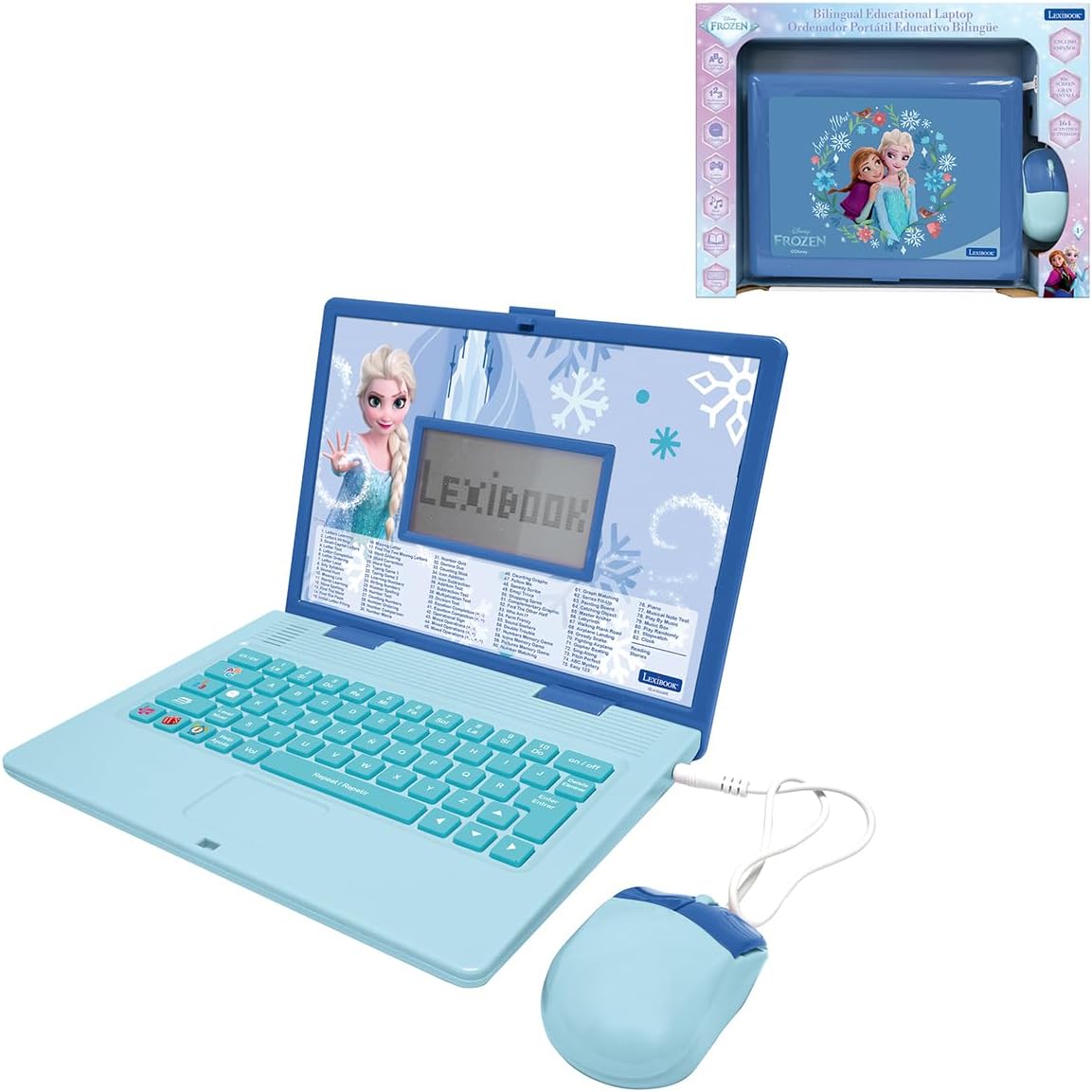
The LEXiBOOK Frozen Educational Laptop brings a popular theme to learning with 164 activities designed to keep children engaged for hours.
We may earn a commission when you buy through this link, at no additional cost to you.
It features bilingual learning modes to build language skills and includes music and logic games. The lightweight design makes it easy to carry.
The screen is a clear LCD but not as vibrant as high end displays. The battery powered nature means it is not always ready to go.
This is ideal for children who love the movie. The extensive activity library ensures there is always something new to explore.
Easily switch between English and Spanish to build strong language skills through fun motivating activities.
Features a comfortable keyboard and clear LCD screen for easy navigation suitable for home or travel.
We may earn a commission when you buy through this link, at no additional cost to you.
Selecting the ideal laptop requires evaluating educational content durability and ease of use to ensure it meets developmental needs.
Look for laptops with structured activities that cover math reading and logic. High quality content adapts to the child's pace to keep them challenged without frustration. This ensures the device remains useful as their skills grow.
Prioritize devices with diverse subject matter and adjustable difficulty levels.
Young children may drop devices so robust construction is essential. Look for rugged cases or shatter-safe screens to prevent damage. A solid build ensures the laptop withstands daily play and learning sessions.
Choose models with protective features designed for active use.
A realistic keyboard helps develop typing skills which are valuable for future learning. Ensure the interface is intuitive so children can navigate independently without constant help. Ergonomic design also supports comfortable hand placement.
Opt for devices with full size keys and clear layouts.
Decide if you want offline or online capabilities. Offline toys are safer and simpler while online devices offer more content but require monitoring. Ensure any online features have strong parental controls.
Select based on your comfort with internet access.
Battery powered devices offer portability but require frequent replacements. Rechargeable models are more economical and eco friendly. Check the expected battery life to ensure the device lasts through typical play periods.
Consider rechargeable options for convenience and cost savings.
Safety features allow parents to manage content and time limits. Robust controls ensure a safe environment and tailored experience for the child. This peace of mind is critical for digital devices.
Verify that parental settings are easy to set and use.
Children are more likely to engage with a device that matches their interests. Themes like princesses or animals can make learning more exciting. However ensure the design does not compromise functionality.
Choose a theme that resonates with your child's preferences.
Consider how long the laptop will remain useful. Devices with adjustable levels grow with the child providing better value. This avoids the need to buy a new device every year.
Look for features that adapt to growing skills.
Start by setting up any parental controls and registering the device according to the manual. Ensure you have fresh batteries or a full charge before the first session.
Sit with your child initially to demonstrate how the keyboard and screen work. Encourage them to explore the activities at their own pace to build confidence.
Keep the device in a cool dry place when not in use to protect the electronics. Regularly wipe the screen with a soft cloth to maintain visibility and cleanliness.
The best option depends on specific needs but the VTech Genio Bilingual JuniorBook is highly recommended for its balanced features. It offers realistic keyboard input offline activities and bilingual support to suit various learning styles effectively.
Most toy laptops are designed to work offline to ensure safety and simplicity. However some premium models like the LEXiBOOK LAPTAB require internet to access their full app library.
Yes these devices are built with safety in mind using non toxic materials and rounded edges. They also lack internet browsers unless specifically designed with robust parental controls to manage access.
Battery life varies by model but typically ranges from several hours to a full day of play. Rechargeable options offer extended use without the cost of replacing standard batteries regularly.
Some advanced models offer progress tracking features while basic toys focus on immediate engagement. Check the product specifications to see if it includes parental apps or data reporting.
Many models are designed to withstand drops and rough play with sturdy casings. Look for features like shatter-safe screens or rubberized corners for enhanced durability.
We have reviewed ten top laptops for 5 year olds including the VTech Genio and LeapFrog models. Each offers unique benefits from bilingual learning to creative camera features.
Prioritize educational content and ease of use when making your final decision. A device that matches your child's interests will encourage regular practice.
Prices and availability can change frequently so check current listings before purchasing. Investing in the right tool now sets a strong foundation for future learning.