
THUSTAR 8MP Document Camera
4.4Editor score
8MP resolution output
Dual microphones included
Foldable portable design
Selecting the right document projector for classroom use is essential for modern educators who need to share physical materials clearly. These devices transform books, worksheets, and 3D objects into large projected images visible to every student in the room.
Our team analyzed ten leading models based on resolution, connectivity options, ease of use, and compatibility with popular educational software. We focused on devices that offer reliable performance for both live demonstrations and recorded lessons to ensure versatile teaching tools.
Each pick below highlights specific strengths such as wireless capability, high resolution, or budget-friendly pricing to help you decide quickly. Remember that product availability and pricing fluctuate frequently so always check current listings before making your final purchase decision.
4.4Editor score

4.5Editor score

4.6Editor score
As an Amazon Associate we earn from qualifying purchases.
This side-by-side comparison breaks down the key specifications of all ten products to help you see the differences in resolution, connectivity, and design features at a glance.





The IPEVO V4K stands out as the top choice for classrooms needing sharp visuals without breaking the budget. Its 8MP Sony CMOS sensor delivers ultra high definition images up to 3264 by 2448 pixels ensuring students see every detail clearly.
We may earn a commission when you buy through this link, at no additional cost to you.
This device offers a high frame rate of up to 30 fps at full HD which is crucial for showing live writing or movement without lag. The multi-jointed stand allows you to position the camera at various angles to capture books or 3D objects effectively.
While it lacks wireless connectivity the USB connection ensures a stable link to your computer for reliable streaming. The fast focusing speed minimizes interruptions when switching between different materials making lesson flow smoother and more engaging.
Educators who prioritize image quality and reliability will find this camera an excellent addition to their setup. It works seamlessly with Mac PC and Chromebook systems making it versatile for any modern classroom environment today.
The 8MP camera captures fine details in text and diagrams ensuring even back row students can read small print without straining their eyes.
Streaming at 30 fps ensures smooth live demos without lag so students stay engaged during interactive lessons and real time demonstrations.
We may earn a commission when you buy through this link, at no additional cost to you.
The THUSTAR 8MP document camera offers an accessible entry point for schools needing basic document projection capabilities at a competitive price. It captures ultra-high definition images up to 2448p with 30fps support for live transmission during lessons.
We may earn a commission when you buy through this link, at no additional cost to you.
Its adjustable image reversal feature lets you manually tweak how the image appears during video chat or output which is helpful for correcting orientations instantly. The built-in dual silicon microphones reduce noise and improve sound quality for clear audio in remote settings.
The foldable design means it takes up minimal desk space when not in use and is easy to carry between rooms. Three levels of brightness adjustable LED lights ensure you can capture clear images even in challenging lighting conditions.
This model is ideal for budget conscious buyers who still want essential features like USB plug-and-play compatibility with Windows Mac and Chromebooks. It supports popular conferencing tools making it a practical choice for hybrid teaching needs.
Drivers install automatically when plugged into a computer so setup is quick and easy without needing extra software or technical support.
The embedded design folds down small so it is easy to carry and store freeing up valuable desk space in crowded classrooms.
We may earn a commission when you buy through this link, at no additional cost to you.
The IPEVO VZ-X Wireless takes document projection to the next level with its versatile connectivity options and freedom of movement. It supports Wi-Fi HDMI and USB modes giving you flexibility to connect to computers projectors TVs or mobile devices.
We may earn a commission when you buy through this link, at no additional cost to you.
Its 8MP sensor boosted by an Ambarella system-on-a-chip provides excellent color reproduction and noise reduction for crisp visuals. The built-in LED illuminates the viewing area ensuring images are clear even in dimly lit classroom environments.
With 9 to 12 hours of battery life you can run a full class session without interruptions or needing a power outlet nearby. The up to 33-feet wireless range allows you to capture objects all over the room while walking around.
This premium option is perfect for educators who want the flexibility to move around the classroom while projecting content. The swiveling head and multi-jointed stand allow you to capture freely from different heights and angles without tethering to a desk.
Connect wirelessly to iOS Android and tvOS devices so you can project directly without needing cables or a computer intermediary.
Nine to twelve hours of power means the camera lasts through multiple classes without needing to recharge or plug in constantly.
We may earn a commission when you buy through this link, at no additional cost to you.
The Apollo Overhead Projector brings a classic projection method to modern classrooms with reliable brightness and a straightforward interface. It delivers a 2000 lumen output ensuring images remain visible even in rooms with ambient light during daytime sessions.
We may earn a commission when you buy through this link, at no additional cost to you.
Its open head design with a 10 inch by 10 inch LCD display allows you to place transparencies or documents easily for immediate projection. The LCD display ensures clarity and contrast so text and graphics stand out sharply to the audience.
While it lacks the high resolution of digital document cameras this unit offers simplicity and ease of use for traditional teaching aids. The VGA and USB ports provide basic connectivity options for integrating with existing classroom AV setups.
This projector is suited for institutions that prefer reliable overhead projection technology for transparencies and large documents. Its durable build and consistent performance make it a practical choice for educators who need a steady and bright image display.
Two thousand lumens provide sufficient brightness to project clear images even in well-lit rooms during the day without needing to darken curtains.
The open head design allows quick placement of transparencies or flat materials for immediate viewing without complex software or digital setup.
We may earn a commission when you buy through this link, at no additional cost to you.
The INSWAN INS-2 UHD offers professional grade quality with a 13MP Sony sensor capable of capturing clear 4K Ultra HD images at 30fps. It is best for educators and art instructors who need clear displays for large documents or two page spreads.
We may earn a commission when you buy through this link, at no additional cost to you.
Its multi-joint arm allows flexible angle adjustments for documents up to A3 size ensuring you can capture wide materials without losing detail. The built-in LED light and anti-glare sheet help maintain consistent image quality under various lighting conditions.
Included Documate software adds value by offering zoom annotation video recording scanning whiteboard tools and OCR for enhanced teaching experiences. These features allow you to mark up documents live and save them for later review by students.
Plug-and-play compatibility with Windows Mac iPad and Chromebook makes it easy to connect without extra drivers. This tool is ideal for instructors who need robust software features alongside high resolution hardware for detailed and annotated lesson presentations.
The 13MP Sony sensor captures crisp details ensuring even small text or intricate artwork is visible to the entire classroom clearly.
Included Documate software provides tools for annotation and scanning allowing interactive lessons and easy content sharing with students.
We may earn a commission when you buy through this link, at no additional cost to you.
The Lumens DC166 SXGA delivers reliable document projection with a strong emphasis on optical zoom capabilities for detailed viewing. It supports high resolution UXGA SXGA and XGA modes ensuring flexibility to match different classroom display standards.
We may earn a commission when you buy through this link, at no additional cost to you.
Its 6x optical zoom combined with 8x digital zoom lets you zoom in on small details without losing image quality. The one-touch video recording and playback feature along with internal memory for 120 JPEG images makes it easy to capture lessons instantly.
An SD card slot accepting up to 32 GB offers additional storage options for saving captured content on the device itself. This unit is compatible with all interactive whiteboards making it a versatile tool for schools using interactive display setups.
While the design is traditional its focus on optical zoom and ease of recording makes it practical for quick documentation. It serves well for classrooms that need to capture and share images without relying on complex computer software or connections.
The 6x optical zoom allows you to zoom in on fine details while maintaining sharp image quality unlike digital zoom alone.
One-touch recording and internal memory let you save quick snapshots without needing a computer connection for simple documentation.
We may earn a commission when you buy through this link, at no additional cost to you.
The Epson PowerLite 118 LCD Projector is designed for reliable ceiling mounted setups delivering vibrant images suitable for classroom use. Its 3LCD technology ensures true-to-life colors and brightness that hold up well even in ambient light conditions.
We may earn a commission when you buy through this link, at no additional cost to you.
This model features a durable design with a long lamp life of 17000 hours reducing maintenance needs and total cost of ownership. The HDMI connectivity transfers both video and audio through a single cable simplifying setup for teachers using laptops or document cameras.
Built-in speakers provide engaging projector displays without needing external audio systems making it an all-in-one solution for presentations. The moderator function allows up to 50 users to connect simultaneously which is useful for collaborative lesson sharing.
With its ceiling mountable design this projector offers a professional look and frees up desk space. It is an excellent choice for classrooms needing a permanent reliable projection display that supports multimedia content and interactive teaching.
3LCD technology produces vibrant eye-catching images ensuring diagrams and charts are visible and true to life for students.
The 17000 hour lamp life means less frequent bulb replacements saving time and money over the projector lifespan.
We may earn a commission when you buy through this link, at no additional cost to you.
The DLP Business Projector delivers 3300 lumens of brightness ensuring display slides and documents are visible in bright office or classroom environments. It is specifically designed for daytime use making it ideal for rooms with windows or open lighting.
We may earn a commission when you buy through this link, at no additional cost to you.
Equipped with a built-in DLP projection system this projector supports natural color presentation and enhanced contrast. These qualities help teaching materials and presentation visuals appear clean detailed and suitable for professional educational use.
Its fast startup design reduces preparation time before lessons allowing users to begin displaying content with less waiting during busy schedules. The simple wired connection setup allows you to connect a cable start the projector and display content without complicated steps.
This model is best suited for spaces needing high brightness and quick operational readiness. With its wide display support it ensures everyone follows content easily during group meetings or classroom instruction sessions.
3300 lumens provide ample brightness to project clear images even with lights on or windows open during the day.
Fast startup means you can start teaching immediately without waiting for the projector to warm up or boot.
We may earn a commission when you buy through this link, at no additional cost to you.
The Epson PowerLite E20 LCD Projector offers reliable performance with vibrant true-to-life images powered by 3LCD technology. It is designed for easy installation with flexible construction that makes it easy to display from virtually anywhere in the room.
We may earn a commission when you buy through this link, at no additional cost to you.
With a long lamp life of 12000 hours this projector provides durability and cost efficiency for long term use. The HDMI connectivity transfers video and audio through a single cable simplifying connections to modern computers and media devices.
A built-in 5-watt speaker ensures engaging projector displays without extra audio equipment. This unit supports ceiling mounting giving you the freedom to maximize floor space and avoid obstacles that could block the image projection path.
This projector is a strong choice for classrooms needing a solid dependable unit for everyday presentations. Its combination of flexible installation and HDMI connectivity makes it adaptable to various teaching setups and content sources.
3LCD technology ensures colors appear vibrant and accurate helping visual content remain clear and engaging for students.
Single cable HDMI transfer makes it easy to connect laptops or tablets for instant display without complex wiring.
We may earn a commission when you buy through this link, at no additional cost to you.
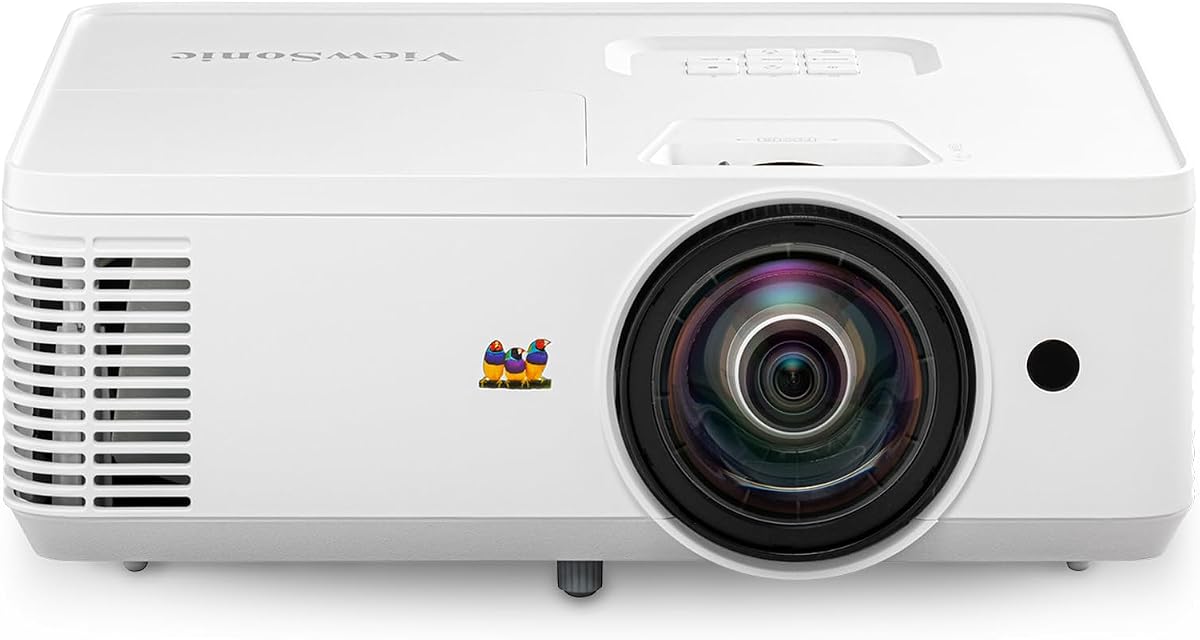
The ViewSonic PS502W Short Throw Projector allows you to project large clear images in small classrooms without casting shadows. Its 0.5 throw ratio means you can project a massive 100-inch image from just 4.5 feet away to maximize floor space.
We may earn a commission when you buy through this link, at no additional cost to you.
Punchy images with 4000 ANSI lumens ensure presentations stay visible and detailed during daytime sessions even with ambient light. SuperColor technology provides a wide color gamut for lifelike visuals in educational or professional settings making content pop on screen.
Vertical auto-keystone correction and digital zoom help achieve a perfectly squared display without manual tweaking. With dual HDMI ports and instant power capabilities setup is fast and stress-free for mobile presenters or permanent installs.
This projector is ideal for tight spaces where traditional projectors might cast shadows or require long distances. Its ability to deliver big images in small rooms and flexible installation options make it a smart choice for many classrooms.
The 0.5 throw ratio projects big images from close range so you avoid shadows and keep the front of the room open.
SuperColor technology delivers stunningly beautiful images with a wide color gamut making content more engaging and clear.
We may earn a commission when you buy through this link, at no additional cost to you.
Choosing the right document projector involves evaluating resolution connectivity and features to match your teaching style and room conditions.
Higher resolution like 8MP or 13MP ensures text and diagrams are sharp even when projected large. Look for models supporting at least 1080p or 4K quality for clear detail in dense materials.
Prioritize higher resolution if you often show small text or detailed artwork to ensure student visibility.
Consider whether you need USB HDMI or wireless Wi-Fi connections to match your existing devices. Wireless options provide mobility while wired connections offer stability.
Choose models that support your specific devices like Chromebooks or Macs for seamless integration.
Look for devices with built-in LED lights or high lumen output to ensure visibility in different lighting conditions. Brighter models are better for daytime classrooms with windows.
If you teach in a dark room low lumen models may suffice but bright rooms need higher brightness.
Some projectors come with companion software for annotation scanning and recording lessons. These tools can enhance interactive teaching and allow content sharing.
If you need to annotate documents live choose models with included or compatible software packages.
If you move between rooms a foldable or lightweight design helps transport the device easily. Check dimensions and weight before buying for portable needs.
Foldable models save desk space and are easier to carry for teachers moving classrooms daily.
Document cameras range from budget friendly options around $50 to premium wireless models over $300. Decide how much you are willing to spend for essential features.
Budget models often work well for basic teaching while premium options offer wireless freedom and higher resolution.
For wireless models battery life matters if you want to move around or avoid cords. Look for at least 8 hours of power to cover a full day.
Shorter battery life means more interruptions to charge which can disrupt lesson flow.
Ensure the device works with your operating system whether Windows Mac or Chromebook. Plug and play support avoids driver installation hassles.
Compatibility with conferencing tools like Zoom or Teams is crucial for distance learning needs.
Begin by connecting your document projector to your computer or display using the appropriate cable or wireless network. Ensure your device drivers are installed so the camera is recognized immediately upon connection.
Adjust the focus and lighting settings to match your environment so images appear sharp and bright. Use built-in software to annotate or capture content during your lesson for later review.
Clean the camera lens gently with a microfiber cloth to remove dust that could blur images. Store the device in a protective case or fold it away when not in use to extend its lifespan.
A document camera captures live video of 3D objects and digital files with higher resolution and zoom capabilities. Overhead projectors require physical transparencies and are bulkier with lower image clarity.
Most document cameras connect to a computer or monitor via USB or HDMI to display images. Some models support direct connection to TVs or mobile devices without needing a laptop.
Yes many document cameras come with software or internal memory that allows you to record video of your demonstrations. This is useful for creating reusable lesson content or remote teaching materials.
Most modern document cameras are compatible with Zoom Google Meet and Microsoft Teams by selecting the camera as the video source. Check system requirements to ensure your operating system is supported.
For most classrooms 8MP or 1080p resolution provides clear text and images. Higher resolutions like 4K are ideal if you need to show fine details or large spreads.
Wireless document cameras typically use a local Wi-Fi network or proprietary wireless protocol to connect to your device. They do not necessarily need internet access but require a stable local network connection.
Selecting the right document projector involves balancing resolution connectivity and features like wireless capability or software tools. Our top picks include the IPEVO V4K for overall performance the THUSTAR for budget buyers and the IPEVO VZ-X for wireless flexibility.
Consider your classroom environment such as ambient light and space constraints when choosing brightness and size. Portability matters if you share a room with other teachers or move between classrooms regularly.
Always verify current pricing and availability since product listings change frequently. Reviewing these factors carefully ensures you invest in a tool that truly enhances your teaching and keeps students engaged.