
Replacement TV Remote for All Fire Series
4.3Editor score
Wide device compatibility
Voice control included
Easy pairing process
This guide compares the top Fire Stick Replacement Remote options for 2026, evaluating voice control, compatibility, battery life, and build quality to help
Finding a reliable Fire Stick Replacement Remote is essential when your original device fails or gets lost. A good remote ensures seamless navigation, voice search capabilities, and comfortable grip for extended viewing sessions without frustration.
We analyzed ten top-rated models based on compatibility, voice functionality, button layout, and user feedback. Each product was evaluated for ease of pairing, durability, and additional features like backlighting or customizable shortcuts to ensure comprehensive coverage.
Each pick highlights unique strengths and ideal use cases for different setups. Keep in mind that availability and pricing fluctuate frequently, so verify current details before purchasing to ensure you get the best value for your specific device needs.
4.3Editor score
4.5Editor score
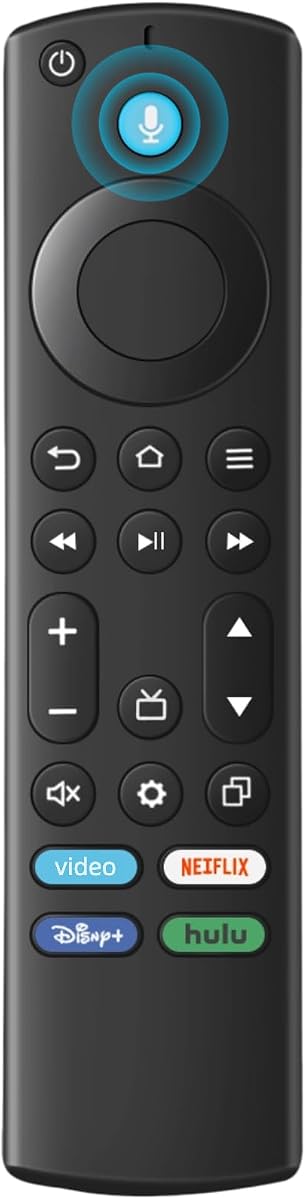
4.2Editor score
The following comparison table outlines key specifications for each of the ten selected replacement remotes. Review these details to quickly identify which model aligns best with your specific Fire TV or Smart TV setup requirements.


This replacement voice remote stands out as a reliable choice for users seeking seamless integration with Fire Stick and Cube devices. Rated 4.2 stars by users, it delivers consistent performance for navigation and voice search across various Fire TV models.
We may earn a commission when you buy through this link, at no additional cost to you.
The remote supports voice commands that allow you to find content quickly without typing. It is compatible with Fire TV Stick 4K Max, Fire TV Cube, and many smart TVs like Omni and Insignia. This versatility ensures it fits into existing setups without needing extra adapters.
While it lacks advanced features like backlighting, the core functionality remains strong. The manual provides clear pairing steps, which simplifies setup for non-tech-savvy users. Battery reliance is standard for this category, so users should expect to replace them periodically.
Ideal for anyone needing a straightforward, cost-effective replacement that restores full voice capabilities. Its broad compatibility makes it a safe bet for households with multiple Fire devices. We recommend verifying your specific model before purchase to ensure perfect fit.
The built-in microphone captures commands accurately, enabling hands-free control for searching shows or adjusting volume. This feature significantly enhances the user experience by reducing friction during daily usage.
Beyond streaming sticks, this remote works with smart TVs that support voice commands. This dual functionality reduces the need for multiple controllers when switching between streaming apps and TV inputs.
We may earn a commission when you buy through this link, at no additional cost to you.
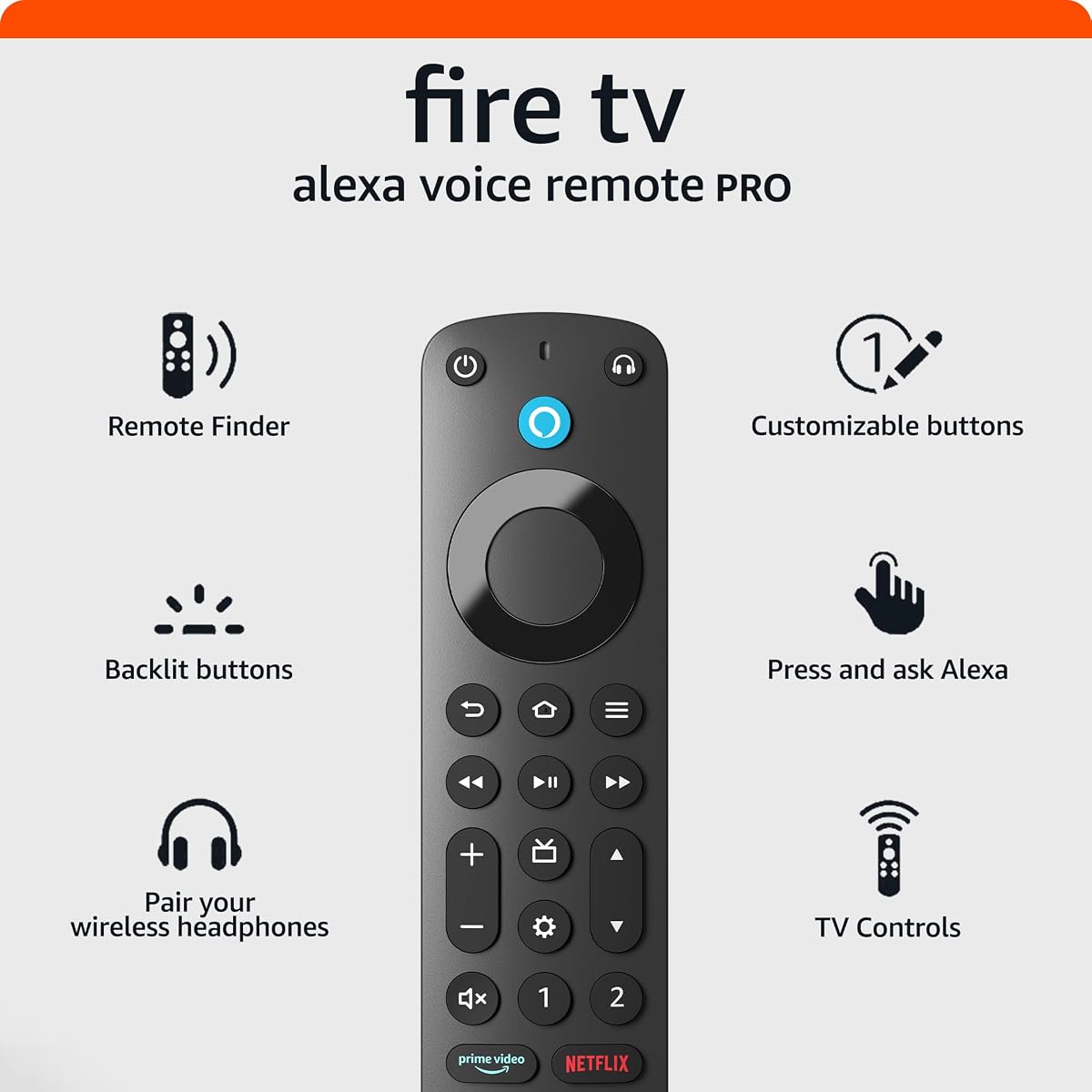
The Amazon Fire TV Alexa Voice Remote Pro offers premium features designed to elevate the streaming experience. With a 4.5-star rating, users praise its ability to locate lost remotes and illuminate buttons automatically in low-light environments.
We may earn a commission when you buy through this link, at no additional cost to you.
Key features include motion-activated backlighting and a dedicated button for pairing Bluetooth headphones quickly. Customizable shortcut buttons allow users to access favorite apps instantly. The remote finder function emits a ring when activated, eliminating the need to search under cushions.
The price is higher than generic alternatives, but the added convenience justifies the cost for frequent users. Compatibility is specific to newer Fire TV models, so checking device requirements is essential. The integrated TV controls also simplify managing power and volume directly.
This remote is best suited for households that value convenience and advanced functionality. It is an excellent upgrade for those tired of fumbling with unlit buttons or losing their controller. We recommend it for users with compatible Fire TV systems seeking top-tier performance.
Using Alexa or the Fire TV app, you can trigger the remote to emit a ring. This feature saves time and frustration, ensuring you never lose your device again during movie nights.
Backlit buttons and dedicated headphone controls make navigation easier in dark rooms. These design choices cater to users who watch content at night or have difficulty seeing small buttons.
We may earn a commission when you buy through this link, at no additional cost to you.
This replacement remote offers exceptional value for those seeking a reliable alternative without breaking the bank. Rated 4.5 stars, it supports a wide range of Fire TV Stick models and Smart TVs, making it a versatile choice for many households.
We may earn a commission when you buy through this link, at no additional cost to you.
The remote includes customization buttons that let you program shortcuts for favorite apps. Voice function requires activation via manual instructions but works well once set up. Compatibility spans Fire TV 4K, Cube, and various Insignia and Toshiba smart TV models.
While it lacks premium features like backlighting, it handles daily navigation effectively. The manual provides clear steps for pairing and voice setup, ensuring a smooth transition from old devices. It is an affordable solution for replacing lost or broken remotes.
Buyers looking for simplicity and cost-efficiency will find this model ideal. It restores full functionality to compatible devices without unnecessary complexity. We recommend checking your device model against the list to ensure compatibility before ordering.
Pressing and holding specific buttons allows you to program access to frequently used apps. This saves time navigating menus and enhances the viewing experience by speeding up content selection.
The remote supports voice commands after following pairing instructions. Users can search content or control playback hands-free, adding convenience to daily streaming routines.
We may earn a commission when you buy through this link, at no additional cost to you.
Designed for users who need reliable connectivity over distance, this remote supports operation up to 12 meters. With a 4.3-star rating, it combines robust signal strength with voice control capabilities for a seamless user experience.
We may earn a commission when you buy through this link, at no additional cost to you.
The remote features four shortcut buttons for quick access to apps. Voice control requires pairing but works effectively once activated. It is compatible with Fire Stick Select, Plus, Max, and HD models from 2020 onward.
Manufacturers test buttons for over 20,000 clicks, ensuring longevity. A 60-day satisfaction guarantee adds peace of mind for buyers. The setup process involves disconnecting power and reconnecting to sync automatically.
Ideal for larger rooms or setups where sitting far from the TV is common. The combination of range and durability makes it a practical choice for daily use. We suggest checking model compatibility to ensure full feature access.
With a range of 12 meters, this remote works effectively even from the back of a large room. This ensures consistent control without needing to point directly at the device constantly.
Button durability is tested to withstand over 20,000 presses. This reliability ensures the remote remains functional through years of heavy usage without degradation.
We may earn a commission when you buy through this link, at no additional cost to you.
This remote simplifies setup by auto-syncing with compatible devices, reducing manual configuration steps. Rated 4.2 stars, it works with Fire Stick Lite, 4K, and Cube models, offering versatile coverage for various streaming needs.
We may earn a commission when you buy through this link, at no additional cost to you.
The remote includes pre-programmed buttons for instant access to popular streaming services. Voice control allows hands-free content searching and volume adjustments. It is designed to work seamlessly with Fire TVs and brands like Insignia and Toshiba.
Users benefit from a straightforward pairing process that minimizes frustration. The manual provides clear instructions for optimal performance. While basic in design, it delivers essential functions reliably for daily entertainment tasks.
Best for users who prioritize ease of use and quick setup. The auto-sync feature saves time compared to manual pairing methods. We recommend verifying device compatibility to ensure all features function correctly.
The remote automatically syncs with your streaming device upon power-up, eliminating complex pairing steps. This feature streamlines the setup process for users of all technical levels.
Pre-programmed buttons provide one-tap access to popular apps. This reduces navigation time and allows viewers to jump quickly into their favorite content.
We may earn a commission when you buy through this link, at no additional cost to you.
With broad compatibility across Fire TV Stick, Cube, and Smart TV models, this remote is designed for versatility. It features a 4.3-star rating, reflecting satisfaction with its ability to replace older controllers effectively.
We may earn a commission when you buy through this link, at no additional cost to you.
The remote includes standard navigation controls and a voice function for content discovery. Pairing involves holding the Home button until the LED indicator flashes, a process detailed in the manual. It supports Fire TV models up to 3rd Gen Smart TVs.
While battery installation is required, the setup process is straightforward. Users appreciate the clear instructions that guide them through activation. The design focuses on essential functions without unnecessary complexity.
Ideal for households with mixed Fire devices needing a unified remote solution. Its wide compatibility reduces the risk of purchasing an incompatible model. We recommend checking your specific device generation before ordering.
Compatible with Stick Lite, 2nd and 3rd Gen, 4K, 4K Max, and Cube models. This coverage ensures it fits into diverse streaming setups without needing multiple remotes.
Pairing uses standard methods involving the Home button and LED indicator. This consistency makes it easy for users familiar with Fire TV remotes to adapt quickly.
We may earn a commission when you buy through this link, at no additional cost to you.
This official Amazon remote offers specialized features like a Guide button for live TV listings. With a 4.5-star rating, it is praised for including batteries out-of-the-box and providing integrated TV control options.
We may earn a commission when you buy through this link, at no additional cost to you.
The remote is compatible with Fire TV Stick HD, 3rd Gen, and 4K models. It features preset app buttons for quick access to popular services. The Guide button simplifies navigating live TV channels and program schedules.
Users value the convenience of receiving batteries with the purchase. The voice control integration allows for easy content searches via Alexa. However, it lacks customizable buttons found in higher-tier models.
Best for users wanting an authentic replacement with added live TV features. The inclusion of batteries and strong compatibility make it a practical choice. We recommend verifying device compatibility before purchasing to ensure full functionality.
The Guide button provides program listings for live TV apps in one place. This streamlines the experience of browsing channels without switching inputs repeatedly.
The remote includes 2 AAA batteries upon purchase. This convenience saves users from needing to buy batteries separately to get started immediately.
We may earn a commission when you buy through this link, at no additional cost to you.
This remote provides clear visual feedback during pairing via an LED indicator that flashes when in pairing mode. With a 4.4-star rating, it is reliable for users needing basic voice control and navigation for Fire TV devices.
We may earn a commission when you buy through this link, at no additional cost to you.
The remote supports voice commands and is compatible with Fire Stick Lite and Cube models. Pairing instructions are straightforward, involving holding the Home button and waiting for the LED to stabilize. This feedback loop ensures users know when connection is successful.
While it requires manual pairing and lacks backlighting, its core functionality is solid. The voice feature allows hands-free operation, which enhances convenience. It works well for standard entertainment setups without extra frills.
Ideal for users who value clear setup feedback and simplicity. The LED indicator reduces guesswork during initial configuration. We recommend checking your device model compatibility to avoid setup issues.
The LED flashes during pairing to confirm connection status. This visual cue helps users know when the remote is ready without guessing or retrying.
Voice commands are supported for content search and playback control. This reduces the need for manual navigation and speeds up access to desired programs.
We may earn a commission when you buy through this link, at no additional cost to you.
Designed to work with Insignia and Toshiba Smart TVs, this remote bridges the gap between streaming sticks and TV controls. It features a 4.3-star rating for its ability to handle multiple devices and voice commands reliably.
We may earn a commission when you buy through this link, at no additional cost to you.
The remote supports presets for app shortcuts, allowing quick access to streaming services. Voice function lets users search content without navigating menus. It is compatible with Fire TV Cube and 3rd Gen Smart TV models.
Pairing involves holding the Home button until the LED flashes. The manual guides users through this process clearly. The design focuses on essential controls that work across various smart TV brands.
Best for households with non-Amazon smart TVs needing unified control. Its compatibility reduces the need for multiple remotes. We recommend verifying TV model compatibility before purchasing for best results.
The remote works with Insignia, Toshiba, and Pioneer smart TVs. This feature simplifies living room setups by reducing the need for multiple controllers.
App shortcuts provide one-click access to favorite services. This saves time and enhances the user experience by minimizing menu navigation.
We may earn a commission when you buy through this link, at no additional cost to you.
This remote is supported by a dedicated team that assists with pairing and setup issues. It features a 4.4-star rating for its reliability across Fire TV Stick and Cube models, plus various Smart TV brands like Omni.
We may earn a commission when you buy through this link, at no additional cost to you.
The remote includes 4 shortcut buttons for quick app access. Voice commands are supported for hands-free content control. Pairing involves holding the Home button until the LED blinks, a process detailed in the guide.
While standard in design without backlighting, it performs essential functions well. The support team ensures buyers get help if initial setup fails. It is a robust choice for users needing broad compatibility.
Ideal for those who want reliable performance and responsive customer service. The support team adds confidence for users encountering setup hurdles. We recommend checking device model details before purchase.
A dedicated support team helps with setup and pairing questions. This ensures users get assistance even if they face initial technical challenges.
Compatible with Fire Stick HD, Lite, 4K, and Cube models. It also works with Omni and QLED Smart TVs for unified control.
We may earn a commission when you buy through this link, at no additional cost to you.
Selecting the right Fire Stick Replacement Remote involves evaluating compatibility, features, and build quality. Use these factors to narrow down the best options for your specific TV setup.
Ensure the remote supports your specific Fire TV model or Smart TV brand. Some models only work with certain generations or brands like Insignia, Toshiba, or Omni. Checking the compatibility list before buying prevents functional issues.
Always verify your device model number against the product specifications to guarantee a successful pairing.
Voice commands streamline content search and playback control. Look for remotes with clear built-in microphones and support for Alexa. This feature is essential for hands-free operation and faster navigation through streaming apps.
Prioritize models that explicitly mention voice command support and easy activation steps.
Consider the button layout and whether it includes customizable shortcuts. Remotes with app-specific buttons allow faster access to streaming services. A logical layout enhances usability during extended viewing sessions.
Look for remotes that offer customizable or preset buttons to suit your app preferences.
Signal range ensures the remote works even when you are far from the device. Models with tested ranges up to 12 meters offer better reliability for large living rooms. This prevents connection drops during use.
Choose remotes with verified signal strength for consistent performance at a distance.
Most remotes require 2 AAA batteries, though some may include them. Check if the package includes batteries or if you need to buy them separately. This impacts the initial setup effort.
Always confirm battery inclusion to avoid delays in using your new remote immediately.
Durability is key for daily use. Look for remotes tested for high click counts on buttons. Sturdy construction ensures the device lasts longer without wear affecting performance.
Opt for brands that provide durability testing data or satisfaction guarantees.
Advanced features like backlighting, remote finders, or headphone buttons add convenience. While not essential, these features enhance the user experience significantly. Decide if these extras are worth the additional cost.
Consider premium features based on your usage environment and personal preferences.
Good customer support ensures you get help if pairing fails. Remotes backed by satisfaction guarantees or dedicated support teams provide added peace of mind. This reduces the risk of purchasing a defective unit.
Check the seller's return policy and support responsiveness before buying.
To start using your new remote, insert two AAA batteries into the compartment ensuring correct polarity. Follow the pairing instructions provided in the manual which typically involve pressing the Home button for ten seconds.
Once paired, test all buttons including voice commands to ensure full functionality. Use the shortcut buttons to access apps quickly without navigating through menus repeatedly.
Keep the remote clean by wiping it with a dry cloth regularly. Avoid exposing it to moisture or extreme temperatures to maintain battery life and signal reliability.
Most replacement remotes are designed for newer models like 3rd Gen Fire Stick or Fire TV Cube. Older models such as 1st Gen devices may not be compatible. Always check the specific compatibility list before purchasing to ensure it works with your device.
Pairing usually requires disconnecting power from your device and reconnecting it. Then press and hold the Home button for ten to fifteen seconds until the LED indicator flashes. Wait a minute for the device to recognize the remote automatically.
Pairing issues often occur if batteries are weak or if the device is too far away. Try replacing the batteries or moving closer to the device. Ensure no other devices are interfering with the Bluetooth signal during setup.
Many replacement remotes support compatible smart TVs like Insignia, Toshiba, or Pioneer. These remotes use IR or Bluetooth to connect. Check the product description to confirm support for your specific TV brand.
Some remotes include dedicated buttons for controlling soundbar volume and power. Verify that the specific model mentions audio device support in its description. This allows centralized control without needing a separate audio remote.
Most Fire Stick replacement remotes require two AAA batteries. Some units come with batteries included while others do not. Check the package contents to avoid needing a separate purchase.
Battery life depends on usage frequency but typically lasts several months. Voice commands consume more power so expect shorter duration if used often. Replacing batteries promptly restores full functionality.
Yes, premium models like the Fire TV Alexa Voice Remote Pro offer motion-activated backlighting. This feature illuminates buttons in dark rooms. Standard replacement remotes usually lack this function to keep costs lower.
We explored ten top Fire Stick Replacement Remote options ranging from budget-friendly models to premium features. Each remote offers unique strengths in compatibility, voice control, and ease of pairing.
Prioritize compatibility and voice features when selecting your next remote. Ensure the model matches your Fire TV generation to avoid setup issues. A well-chosen remote enhances your streaming experience significantly.
Remember that prices and availability change frequently. Verify current details and user reviews before purchasing. Choosing the right remote ensures reliable performance and frustration-free entertainment.