
SSK Portable SSD 1TB
4.5Editor score
1050MB/s Read Speed
Slim and Lightweight Design
Includes USB-C and USB-A Cables
Explore our expert guide comparing the best external SSD for Mac Mini M4 to optimize storage and workflow efficiency for your desktop setup.
Choosing the right external SSD for Mac Mini M4 ensures seamless integration and high-speed performance for your creative and professional workflows.
We evaluated top models based on speed, compatibility, durability, and design to help you find the perfect storage solution for your specific needs.
Each pick highlights key strengths and potential trade-offs so you can make an informed decision while keeping in mind that prices fluctuate often.
4.5Editor score
4.8Editor score

3.9Editor score
The following table provides a side-by-side comparison of all ten models including their key specifications and standout features for quick reference.




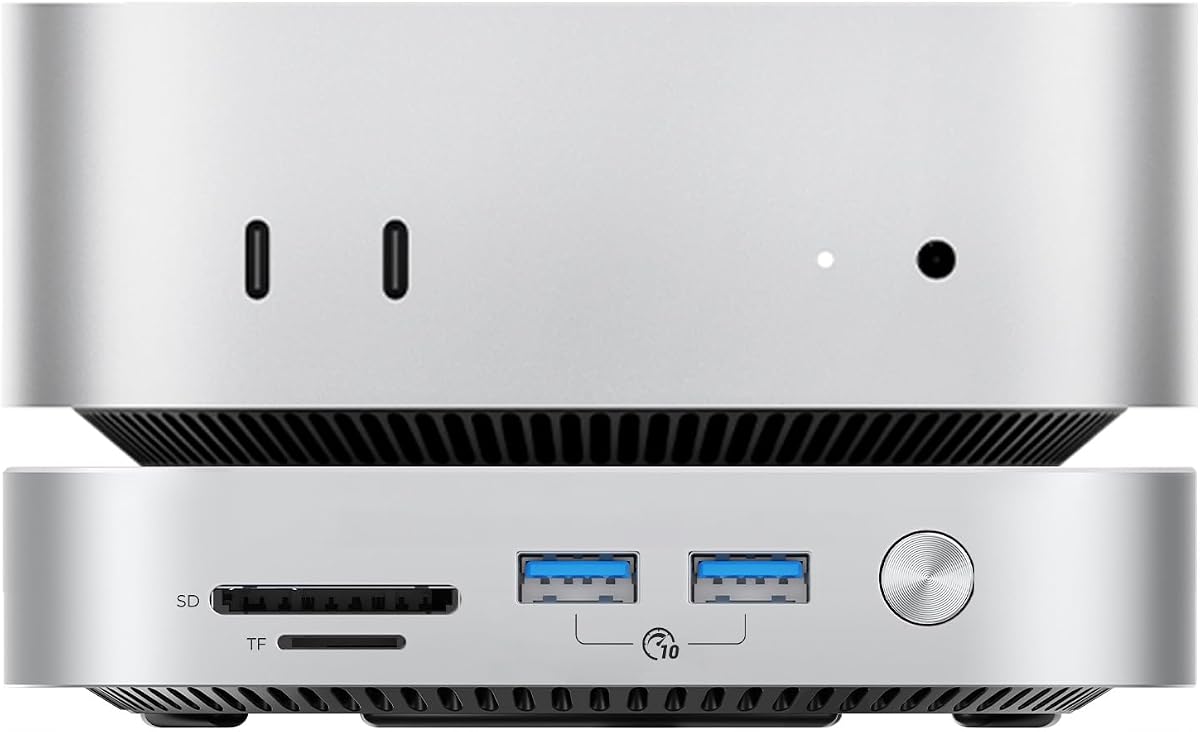
The ORICO 2TB External SSD stands out as a top choice for Mac Mini M4 users due to its dedicated expansion design and robust feature set.
We may earn a commission when you buy through this link, at no additional cost to you.
Its ability to attach directly to the Mac Mini with a high-speed NVMe SSD allows for significant storage doubling without cluttering your workspace.
While it is larger than standard portable drives the included port multiplier and intelligent cooling make it ideal for sustained professional workloads.
This drive is best suited for creative professionals who need reliable high-speed storage and seamless ecosystem compatibility right out of the box.
Designed specifically for Mac Mini models this bundle ensures plug-and-play setup and Time Machine compatibility without extra configuration steps.
Three USB 3.0 ports and card readers allow you to connect peripherals and transfer files simultaneously without needing a separate hub.
We may earn a commission when you buy through this link, at no additional cost to you.
Samsung T7 Portable SSD delivers fast speeds and durable features that make it a reliable option for general storage expansion needs.
We may earn a commission when you buy through this link, at no additional cost to you.
Its compact design combined with PCIe NVMe technology ensures that file transfers are nearly twice as fast as previous generation models.
The aluminum unibody construction provides excellent shock resistance making it suitable for travel and everyday use without worry.
This drive is a solid pick for those who value brand reputation and consistent performance across a variety of devices and systems.
With read speeds up to 1050MB/s you can move large video files and photo libraries in a fraction of the time.
Designed to withstand drops up to 6 feet this drive offers peace of mind when working on the go or in busy environments.
We may earn a commission when you buy through this link, at no additional cost to you.
Lexar 2TB ES3 offers a compelling combination of speed and capacity making it an attractive option for users needing ample space.
We may earn a commission when you buy through this link, at no additional cost to you.
Its double layer graphite sheets help keep the drive cool during intense file transfers ensuring consistent performance over time.
The included 2-in-1 USB-C USB-A cable adds convenience allowing you to use it with various devices without adapters.
Ideal for everyday office use or creative projects this drive balances cost and performance effectively for most general storage requirements.
The built-in graphite sheets conduct heat away efficiently preventing thermal throttling during long duration file operations.
With resistance up to 2 meters this drive can handle accidental drops better than many other plastic bodied competitors.
We may earn a commission when you buy through this link, at no additional cost to you.
Sandisk 1TB Extreme Portable SSD delivers nearly twice the speed of previous generations making it ideal for high-resolution media workflows.
We may earn a commission when you buy through this link, at no additional cost to you.
Its IP65 rating and drop protection up to 3 meters ensure reliability in tough conditions or accidental handling incidents.
The 256-bit AES encryption keeps your private files secure and easy to manage without needing extra software installation.
This drive is perfect for creators who need a fast rugged and secure drive for transporting large files between work sites.
Combining 2000MB/s speeds with hardware encryption this drive offers both performance and peace of mind for sensitive data.
Small enough to fit in your pocket it is built to survive spills and drops making it a reliable travel companion.
We may earn a commission when you buy through this link, at no additional cost to you.
Lexar ES3 1TB Portable SSD features a thin stylish design that is easy to carry and works well with modern mobile and desktop systems.
We may earn a commission when you buy through this link, at no additional cost to you.
With speeds up to 1050MB/s it handles fast file transfers efficiently whether you are using a Mac or an Android device.
The included Type-C cable simplifies connectivity and the Lexar DataShield software adds a layer of security for important files.
This drive is a great choice for users who prioritize portability and clean aesthetics without sacrificing essential performance features.
Weighing only 42g and 10.5mm thick it slips easily into pockets and bags for effortless transport on the go.
Built-in 256-bit AES encryption software ensures your data stays protected with password security on all supported devices.
We may earn a commission when you buy through this link, at no additional cost to you.
SSK Portable SSD 1TB offers excellent value with a slim design and fast speeds that meet the needs of most everyday users.
We may earn a commission when you buy through this link, at no additional cost to you.
The aluminum alloy case ensures efficient heat dissipation while maintaining a lightweight profile that is easy to carry anywhere.
Inclusion of both USB-C and USB-A cables means you can connect to a wide range of devices without needing adapters.
This drive is the best budget choice for those seeking reliable performance and portability without spending on premium brand features.
SLC caching allocates 25% of capacity to high-speed cache ensuring steady transfer rates even during large file operations.
Ready to use out of the box it comes with all necessary cables and a durable case for immediate setup and use.
We may earn a commission when you buy through this link, at no additional cost to you.
Crucial X10 2TB Portable SSD combines ultra-fast speeds with a massive 2TB capacity suitable for students gamers and professionals.
We may earn a commission when you buy through this link, at no additional cost to you.
Its durable build with IP65 dust and water resistance makes it perfect for travel and various weather conditions worldwide.
Bonus software like Mylio Photos plus and Acronis True Image adds extra value to your purchase for data management and backup.
This drive is ideal for anyone needing significant storage space in a compact durable form factor that handles demanding file loads.
Rated to withstand drops up to 3 meters and dust and water ingress it is built to survive travel and rough handling.
Included three months of photo management and image software helps you organize and protect your files right away.
We may earn a commission when you buy through this link, at no additional cost to you.
Samsung T9 Portable SSD offers nonstop speed for creators with sustained read and write rates that keep your workflow moving.
We may earn a commission when you buy through this link, at no additional cost to you.
Its Dynamic Thermal Guard ensures the drive stays cool during heavy use preventing slowdowns or overheating during long sessions.
The solid design and Magician Software provide robust monitoring and updates to maintain drive health over time.
This drive is perfect for professional editors and creators who need the fastest reliable portable storage available on the market.
Advanced thermal solution controls heat effectively so performance remains high even under sustained heavy workload conditions.
Regular firmware updates and encryption tools help keep your drive running smoothly and securely for years of use.
We may earn a commission when you buy through this link, at no additional cost to you.
SABRENT Rocket Nano XTRM delivers Thunderbolt 3 speeds making it a top tier option for professionals needing rapid data access.
We may earn a commission when you buy through this link, at no additional cost to you.
Its compact aluminum body helps with heat dissipation during sustained transfers ensuring reliability and data protection during editing.
Included Thunderbolt and USB cables mean you can use it on various systems without buying extra adapters immediately.
This drive is best for professional users who require maximum speed and portability for large 4K and 6K video workflows.
With up to 2700MB/s transfer speeds this drive handles 4K video editing without lag or interruption.
Comes with both Thunderbolt and USB cables so you can connect to any system with ease.
We may earn a commission when you buy through this link, at no additional cost to you.
SanDisk Professional 4TB PRO-G40 SSD provides extreme speeds and durability for professionals needing robust storage for demanding projects.
We may earn a commission when you buy through this link, at no additional cost to you.
Its IP68 rating and 3m drop resistance offer the highest level of physical protection against environmental hazards and handling.
The premium aluminum enclosure keeps the internal drive cool ensuring consistent performance even during intensive workloads.
This drive is the top premium pick for professionals who need maximum capacity and speed without compromising on ruggedness.
IP68 dust and water resistance combined with crush resistance makes it reliable in any environmental condition.
Thunderbolt 3 support delivers up to 3000MB/s speeds for fast project transfers and backup workflows.
We may earn a commission when you buy through this link, at no additional cost to you.
Selecting the right external SSD for your Mac Mini M4 involves considering several critical factors to ensure optimal performance and compatibility.
Determine how much storage you need based on your typical file sizes and workflow requirements to avoid frequent upgrades or backups.
For most users 1TB or 2TB offers a good balance between cost and space while professionals may prefer 4TB for large media libraries.
Look for SSDs with USB 3.2 Gen 2 or Thunderbolt support to match the Mac Mini M4 interface speeds and avoid bottlenecks.
Higher read write speeds mean faster backups quicker file access and smoother editing workflows on your system.
Ensure the drive uses USB-C or Thunderbolt connectors that fit your Mac Mini M4 ports directly without needing extra adapters.
Some drives include multiple cable options to bridge USB-C and USB-A which adds convenience for other devices.
Choose models with metal enclosures and IP ratings if you plan to use the drive in travel or rugged environments frequently.
Shock resistance and drop protection are essential for portable drives that might be moved or handled regularly.
SSDs can throttle performance if they overheat so consider drives with aluminum bodies or cooling features for sustained use.
Efficient heat dissipation ensures consistent speeds during long transfers or continuous operation like Time Machine backups.
Some drives come with encryption software and management tools that help secure your data and organize backups effectively.
Password protection and drive health monitoring features add value especially for users storing sensitive business data.
Check the manufacturer warranty period and customer support options before buying to ensure long-term reliability and service access.
Brands that offer extended warranties or free registration often provide better peace of mind for expensive storage investments.
To start using your external SSD connect it to an available USB-C port on your Mac Mini M4 using the included cable and wait for the system to recognize it.
Format the drive to APFS or ExFAT via Disk Utility if needed to ensure full compatibility with macOS and other devices you use regularly.
Keep the drive in a cool dry place and avoid bending the cable excessively to maintain its lifespan and ensure reliable performance over time.
The fastest external SSDs for Mac Mini M4 are those supporting Thunderbolt 3 or USB 3.2 Gen 2×2 such as the SanDisk Professional PRO-G40 and SABRENT Rocket Nano XTRM which offer speeds up to 3000MB/s and 2700MB/s respectively.
Most external SSDs come pre-formatted for Windows which may require formatting to APFS for macOS compatibility using Disk Utility to ensure full read write functionality on your Mac Mini M4.
Yes external SSDs are excellent for Time Machine backups due to their fast speeds and reliability making your backups quicker and restore processes more efficient than using traditional hard drives.
The number depends on your hub or dock but Mac Mini M4 supports multiple external drives via its ports and USB hubs allowing you to connect several SSDs simultaneously for expanded storage.
Thunderbolt drives offer higher bandwidth and faster data transfer rates which is ideal for video editing and large file workflows while USB-C SSDs are more cost effective and sufficient for general use.
Protect your data by using built-in encryption features if available keeping multiple backups and avoiding physical shocks or drops during travel and daily handling of your drive.
Choosing the right external SSD for Mac Mini M4 depends on balancing speed capacity and budget to fit your specific workflow needs effectively.
Prioritize features like Thunderbolt support and durable build quality if you need high performance and reliability for professional creative work.
Always check current prices and promotions before purchasing since storage pricing changes frequently and sales can offer significant value for the models listed.